GIN - a colorless alcoholic beverage made by distilling or redistilling rye or other grain spirits and adding juniper berries or aromatics such as anise, caraway seeds, or angelica root as flavoring.
VODKA - originally distilled from fermented wheat mash but now also made from a mash of rye, corn, or potatoes.
RUM - distilled from cane juice, or from the scummings of the boiled juice, or from treacle or molasses, or from the lees of former distillations. Also, sometimes used colloquially as a generic or a collective name for intoxicating liquor.
WHISKEY - distilled from grain, potatoes, etc., especially in Scotland, Ireland, and the United States. In the United States, whisky is generally distilled from maize, rye, or wheat, but in Scotland and Ireland it is often made from malted barley.
TEQUILA - an alcoholic liquor distilled from the fermented juice of the Central American century plant Agave tequilana.
BRANDY - an alcoholic liquor distilled from wine or fermented fruit juice.
LIQUEURS (FLAVORED SPIRITS)
Liqueurs are flavored spirits prepared by infusing certain woods, fruits, or flowers, in either water or alcohol, and adding sugar, etc. Others are distilled from aromatic or flavoring agents.
WINES and CHAMPAGNE
RED WINE - wine having a red color derived from skins of dark-colored grapes.
WHITE WINE - any wine of a clear, transparent color, bordering on white, as Madeira, sherry, Lisbon, etc.; -- distinguished from wines of a deep red color, as port and Burgundy.
ROSE WINE - pinkish table wine from red grapes whose skins were removed after fermentation began.
CHAMPAGNE - a sparkling white wine made from a blend of grapes, especially Chardonnay and pinot, produced in Champagne.
SPARKLING WINE - any of various effervescent wines, such as champagne, produced by a process involving fermentation in the bottle.
VERMOUTH - a sweet or dry fortified wine flavored with aromatic herbs and used chiefly in mixed drinks.
ALE
LAGER - a type of beer of German origin that contains a relatively small amount of hops and is aged from six weeks to six months to allow sedimentation.
CIDER
BEER
Sunday, February 27, 2011

Sunday, February 20, 2011
W I N E ( S )
Wine is an alcoholic beverage, made of fermented fruit juice, usually from grapes.The natural chemical balance of grapes lets them ferment without the addition of sugars, acids, enzymes, or other nutrients. Grape wine is produced by fermenting crushed grapes using various types of yeast. Yeast consumes the sugars in the grapes and converts them into alcohol. Different varieties of grapes and strains of yeasts produce different types of wine.
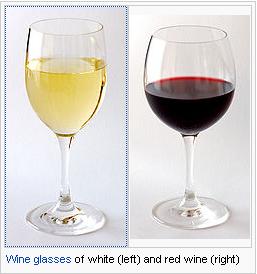
Wines made from other fruits, such as apples and berries, are normally named after the fruit from which they are produced (for example, apple wine or elderberry wine) and are generically called fruit wine or country wine (not to be confused with the French term vin de pays). Others, such as barley wine and rice wine (i.e., sake), are made from starch-based materials and resemble beer and spirit more than wine, while ginger wine is fortified with brandy. In these cases, the term "wine" refers to the higher alcohol content rather than production process.The commercial use of the English word "wine" (and its equivalent in other languages) is protected by law in many jurisdictions.
Wine has a rich history dating back to around 8000 BC and is thought to have originated in areas now within the borders of Armenia, Georgia and Iran. Wine first appeared in Europe at about 4500 BC in the Balkans, and was very common in ancient Greece, Thrace and Rome. Wine has also played an important role in religion throughout history. The Greek god Dionysus and the Roman equivalent Bacchus represented wine, and the drink is also used in Christian Eucharist ceremonies and the Jewish Kiddush.
Etymology:
The English word "wine" comes from the Proto-Germanic "*winam," an early borrowing from the Latin vinum, "wine" or "(grape) vine," itself derived from the Proto-Indo-European stem *win-o-.
History:
Archaeological evidence suggests that the earliest known production of wine, made by fermenting grapes, took place in sites in Georgia and Armenia from as early as 8000-6000 BC. These locations are all within the natural area of the European grapevine Vitis vinifera. Pressing wine after the harvest; Tacuinum Sanitatis, 14th century.
The oldest known evidence of wine production in Europe is dated to 4500 BC and comes from archaeological sites in Greece. The same sites also contain the world's earliest evidence of crushed grapes.On January 11, 2011 in one of Armenia's Vayots Dzor province cave was found world’s oldest winery dating to approximately 6000 years ago.
Viticulture in India has a long history dating back to the time of the Indus Valley civilization when grapevines were believed to have been introduced from Persia sometime in the 5000 BC. The first known mentioning of grape-based wines was in the late 4th century BC writings of Chanakya who was the chief minister of Emperor Chandragupta Maurya. In his writings, Chanakya condemns the use of alcohol while chronicling the emperor and his court's frequent indulgence of a style of grape wine known as Madhu.
Archaeologists indicates a possibility that grapes were mixed with rice to produce mixed fermented beverages in China in the early years of the seventh millennium BC.
Grape Varities:
Wine is usually made from one or more varieties of the European species Vitis vinifera, such as Pinot Noir, Chardonnay, Cabernet Sauvignon, Gamay and Merlot. When one of these varieties is used as the predominant grape (usually defined by law as a minimum of 75% or 85%), the result is a varietal, as opposed to a blended, wine. Blended wines are not necessarily considered inferior to varietal wines; some of the world's most expensive wines, from regions like Bordeaux and the Rhone Valley, are blended from different grape varieties of the same vintage.
Wine can also be made from other species of grape or from hybrids, created by the genetic crossing of two species. Vitis labrusca (of which the Concord grape is a cultivar), Vitis aestivalis, Vitis rupestris, Vitis rotundifolia and Vitis riparia are native North American grapes usually grown to eat fresh or for grape juice, jam, or jelly, but sometimes made into wine.
Hybridization is different than grafting. Most of the world's vineyards are planted with European V. vinifera vines that have been grafted onto North American species rootstock. This is common practice because North American grape species are resistant to phylloxera, a root louse that eventually kills the vine. In the late 19th century, most of Europe's vineyards (only excluding some of the driest vineyards in Southern Europe) were devastated by the bug, leading to massive vine deaths and eventual replanting. Grafting is done in every wine-producing country of the world except for Argentina, the Canary Islands and Chile—the only countries not yet exposed to the insect.
In the context of wine production, terroir is a concept that encompasses the varieties of grapes used, elevation and shape of the vineyard, type and chemistry of soil, climate and seasonal conditions, and the local yeast cultures. The range of possibilities here can result in great differences between wines, influencing the fermentation, finishing, and aging processes as well. Many wineries use growing and production methods that preserve or accentuate the aroma and taste influences of their unique terroir. However, flavor differences are not desirable for producers of mass-market table wine or other cheaper wines, where consistency is more important. Such producers try to minimize differences in sources of grapes through production techniques such as micro-oxygenation, tannin filtration, cross-flow filtration, thin film evaporation, and spinning cones.
Acid in Wines:
The acids in wine are an important component in both winemaking and the finished product of wine. They are present in both grapes and wine, having direct influences on the color, balance and taste of the wine as well as the growth and vitality of yeasts during fermentation and protecting the wine from bacteria. Most wines having a pH between 2.9–3.9. Generally, the lower the pH, the higher the acidity in the wine. However, there is no direct connection between total acidity and pH (it is possible to find wines with a high pH for wine and high acidity). In wine tasting, the term “acidity” refers to the fresh, tart and sour attributes of the wine which is evaluated in relation to how well the acidity balances out the sweetness and bitter components of the wine such as tannins.
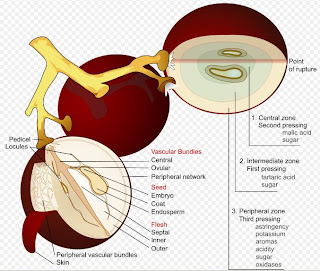
The acidity in wine is an important component in the quality and taste of the wine. It adds a sharpness to the flavors and is detected most readily by a prickling sensation on the sides of the tongue and a mouth watering after taste. Of particular importance is the balance of acidity versus the sweetness of the wine (the left over residual sugar) and the more bitter components of the wine (most notably tannins but also includes other phenolics). A wine with too much acidity will taste excessive sour and sharp. A wine with too little acidity will taste flabby, flat and with less defined flavors.
Classification:Regulations govern the classification and sale of wine in many regions of the world. European wines tend to be classified by region (e.g. Bordeaux, Rioja and Chianti), while non-European wines are most often classified by grape (e.g. Pinot Noir and Merlot). More and more, however, market recognition of particular regions is leading to their increased prominence on non-European wine labels. Examples of non-European recognized locales include Napa Valley in California, [[peth-dindori valley(wine)india], madhuca indica trible wine from peth |]Willamette Valley in Oregon, Columbia Valley in Washington, Barossa Valley and Hunter Valley in Australia, Central Valley in Chile, Vale dos Vinhedos in Brazil, Hawke's Bay and Marlborough in New Zealand, Okanagan Valley and Niagara Peninsula in Canada.
European Classification: France has various appellation systems based on the concept of terroir, with classifications ranging from Vin de Table ("table wine") at the bottom, through Vin de Pays and Appellation d'Origine Vin Délimité de Qualité Supérieure (AOVDQS) up to Appellation d'Origine Contrôlée (AOC) or similar, depending on the region. Portugal has something similar and, in fact, pioneered this technique in 1756 with a royal charter that created the "Demarcated Douro Region" and regulated wine production and trade.Germany did likewise in 2002, although their system has not yet achieved the authority of those of the other countries'. Spain, Greece and Italy have classifications based on a dual system of region of origin and product quality.
Beyond Europe: Wines from outside of the traditional wine growing regions of Europe tend to be classified by grape rather than by terroir or region of origin, although there have been non-official attempts to classify them by quality.
Vintages:A "vintage wine" is one made from grapes that were all or mostly grown in a particular year. Most countries allow a vintage wine to include a portion that is not from the labelled vintage. Variations in a wine's character from year to year can include subtle differences in color, palate, nose, body and development. High-quality wines can improve in flavor with age if properly stored.
In the United States, for a wine to be vintage dated and labeled with a country of origin or American Viticultural Area (AVA) (such as "Sonoma Valley"), it must contain at least 95% of its volume from grapes harvested in that year. If a wine is not labeled with a country of origin or AVA the percentage requirement is lowered to 85%.
Vintage wines are generally bottled in a single batch so that each bottle will have a similar taste. Climate can have a big impact on the character of a wine to the extent that different vintages from the same vineyard can vary dramatically in flavor and quality. Thus, vintage wines are produced to be individually characteristic of the vintage and to serve as the flagship wines of the producer. Superior vintages, from reputable producers and regions, will often fetch much higher prices than their average vintages. Some vintage wines, like Brunellos, are only made in better-than-average years.
Aging of Wine:
The aging of wine, and its ability to potentially improve in quality, distinguishes wine from most other consumable goods. While wine is perishable and capable of deteriorating, complex chemical reactions involving a wine's sugars, acids and phenolic compounds (such as tannins) can alter the aroma, color, mouthfeel and taste of the wine in a way that may be more pleasing to the taster. The ability of a wine to age is influenced by many factors including grape variety, vintage, viticultural practices, wine region and winemaking style. The condition that the wine is kept in after bottling can also influence how well a wine ages and may require significant time and financial investment.
What wine can age ?
Only a few wines have the ability to significantly improve with age. Only around the top 10% of all red wine and top 5% of all white wines can improve significantly enough with age to make drinking more enjoyable at 5 years of age than at 1 year of age. Only the top 1% of all wine has the ability to improve significantly after more than a decade. It is belief that more wine is consumed too old, rather than too young, and that the great majority of wines start to lose appeal and fruitiness after 6 months in the bottle.
Wine with Little or no aging potential: German QBAs, Asti and Moscato Spumante, Rosé and blush wines like White Zinfandel, Branded wines like Yellow Tail, Mouton Cadet, European table wine, American jug & box wine, Inexpensive varietals (with the possible exception of Cabernet Sauvignon), The majority of Vin de pays, All Nouveau wines, Vermouth, Basic Sherry, Ports etc.
Wines with some aging potential: Botrytized wines (5–25 yrs), Chardonnay (2–6 yrs), Riesling (2–30 yrs), Hungarian Furmint (3–25 yrs), Loire Valley Chenin blanc (4–30 yrs), Hunter Valley Semillon (6–15 yrs), Cabernet Sauvignon (4–20 yrs), Merlot (2–10 yrs), Nebbiolo (4–20 yrs), Pinot noir (2–8 yrs), Sangiovese (2–8 yrs), Syrah (4–16 yrs), Zinfandel (2–6 yrs), Classified Bordeaux (8–25 yrs), Grand Cru Burgundy (8–25 yrs), Aglianico from Taurasi (4–15 yrs), Baga from Bairrada (4–8 yrs), Hungarian Kadarka (3–7 yrs), Bulgarian Melnik (3–7 yrs), Croatian Plavac Mali (4–8 yrs), Russian Saperavi (3–10 yrs), Madiran Tannat (4–12 yrs), Spanish Tempranillo (2–8 yrs), Greek Xynomavro (4–10 yrs) etc.
During the aging process, the perception of a wine's acidity may change even though the total measurable amount of acidity is more or less constant throughout a wine's life. This is due to the esterification of the acids, combining with alcohols in complex array to form esters. In addition to making a wine taste less acidic, these esters introduce a range of possible aromas. Eventually the wine may age to a point where other components of the wine (such as a tannins and fruit) are less noticeable themselves, which will then bring back a heightened perception of wine acidity. Other chemical processes that occur during aging include the hydrolysis of flavor precursors which detach themselves from glucose molecules and introduce new flavor notes in the older wine and Aldehydes become oxidized. The interaction of certain phenolics develop what is known as tertiary aromas which are different from the primary aromas that are derived from the grape and during fermentation. An aged Malmsey Madeira shows the color change that white wines goes through as they age.
As a wine starts to mature, its bouquet will become more developed and multi-layered. While a taster may be able to pick out a few fruit notes in a young wine, a more complex wine will have several distinct fruit, floral, earthy, mineral and oak derived notes. The lingering finish of a wine will lengthen. Eventually the wine will reach a point of maturity, when it is said to be at its "peak". This is the point when the wine has the maximum amount of complexity, most pleasing mouthfeel and softening of tannins and has not yet started to decay. When this point will occur is not yet predictable and can vary from bottle to bottle. If a wine is aged for too long, it will start to descend into decrepitude where the fruit tastes hollow and weak while the wine's acidity becomes dominant.
The natural esterification that takes place in wines and other alcoholic beverages during the aging process is an example of acid-catalysed esterification. Over time, the acidity of the acetic acid and tannins in an aging wine will catalytically protonate other organic acids (including acetic acid itself), encouraging ethanol to react as a nucleophile. As a result, ethyl acetate -- the ester of ethanol and acetic acid—is the most abundant ester in wines. Other combinations of organic alcohols (such as phenol-containing compounds) and organic acids lead to a variety of different esters in wines, contributing to their different flavours, smells and tastes. Of course, when compared to sulfuric acid conditions, the acid conditions in a wine are mild, so yield is low (often in tenths or hundredths of a percentage point by volume) and take years for ester to accumulate.
Factors And Infuence - Wine Aging:
The ratio of sugars, acids and phenolics to water is a key determination of how well a wine can age. The less water in the grapes prior to harvest, the more likely the resulting wine will have some aging potential. Grape variety, climate, vintage and viticultural practice come into play here. Grape varieties with thicker skins, from a dry growing season where little irrigation was used and yields were kept low will have less water and a higher ratio of sugar, acids and phenolics. The process of making Eisweins, where water is removed from the grape during pressing as frozen ice crystals, has a similar effect of decreasing the amount of water and increasing aging potential.
In winemaking, the duration of maceration or skin contact will influence how much phenolic compounds are leached from skins into the wine. Pigmented tannins, anthocyanins, colloids, tannin-polysaccharides and tannin-proteins not only influence a wine's resulting color but also act as preservatives. During fermentation adjustment to a wine's acid levels can be made with wines with lower pH having more aging potential. Exposure to oak either during fermentation or after during barrel aging will introduce more phenolic compounds to the wines. Prior to bottling, excessive fining or filtering of the wine could strip the wine of some phenolic solids and may lessen a wine's ability to age.
Storage conditions can influence a wine's aging ability: The storage condition of the bottled wine will influence a wine's aging. Vibrations and heat fluctuations can hasten a wine's deterioration and cause adverse effect on the wines. In general, a wine has a greater potential to develop complexity and more aromatic bouquet if it is allowed to age slowly in a relatively cool environment. The lower the temperature, the more slowly a wine develops. On average, the rate of chemical reactions in wine double with each 18 °F (8 °C) increase in temperature. Wine expert Karen MacNeil, recommends keeping wine intended for aging in a cool area with a constant temperature around 55°F (13°C). Wine can be stored at temperatures as high as 69°F (20°C) without long term negative effect. Professor Cornelius Ough of the University of California, Davis believes that wine could be exposed to temperatures as high as 120 °F (49 °C) for a few hours and not be damaged. However, most experts believe that extreme temperature fluctuations (such as repeated transferring a wine from a warm room to a cool refrigerator) would be detrimental to the wine. The ultra-violet rays of direct sunlight should also be avoided because of the free radicals that can develop in the wine and result in oxidation.
Wines packaged in large format bottles, such as magnums and 3 liter Jeroboams, seem to age more slowly than wines packaged in regular 750 ml bottles or half bottles. This may be because of the greater proportion of oxygen exposed to the wine during the bottle process. The advent of alternative wine closures to cork, such as screw caps and synthetic corks have opened up recent discussions on the aging potential of wines sealed with these alternative closures. Currently there are no conclusive results and the topic is the subject of ongoing research.
Bottle Sickness: One of the short-term aging needs of wine is a period where the wine is considered "sick" due to the trauma and volatility of the bottling experience. During bottling some oxygen is exposed to the wine, causing a domino effect of chemical reaction with various components of the wine. The time it takes for the wine to settle down and have the oxygen fully dissolve and integrate with the wine is considered its period of "bottle shock". During this time the wine could taste drastically different than it did prior to bottling or how it will taste after the wine has settled. While many modern bottling lines try to treat the wine as gently as possible and utilize inert gases to minimize the amount of oxygen exposure, all wine goes through some period of bottle shock. The length of this period will vary with each individual wine.
Dumb Phase: During the course of aging a wine may slip into a "dumb phase" where its aromas and flavors are very muted. In Bordeaux this phase is called the age ingrat or "difficult age" and is likened to a teenager going through adolescence. The cause or length of time that this "dumb phase" will last is not yet fully understood and seems to vary from bottle to bottle.
Wine Tasting:Wine tasting is the sensory examination and evaluation of wine. Wines are made up of chemical compounds similar or identical to those in fruits, vegetables, and spices. The sweetness of wine is determined by the amount of residual sugar in the wine after fermentation, relative to the acidity present in the wine. Dry wine, for example, has only a small amount of residual sugar.
Individual flavors may also be detected, due to the complex mix of organic molecules such as esters and terpenes that grape juice and wine can contain. Experienced tasters can distinguish between flavors characteristic of a specific grape and flavors that result from other factors in wine making. Typical intentional flavor elements in wine are those imparted by aging in oak casks; chocolate, vanilla, or coffee almost always come from the oak and not the grape itself.
Banana flavors (isoamyl acetate) are the product of yeast metabolism, as are spoilage aromas such as sweaty, barnyard, band-aid (4-ethylphenol and 4-ethylguaiacol), and rotten egg (hydrogen sulfide). Some varietals can also have a mineral flavor due to the presence of water-soluble salts (like limestone).
Wine aroma comes from volatile compounds in the wine that are released into the air. Vaporization of these compounds can be sped up by twirling the wine glass or serving the wine at room temperature. For red wines that are already highly aromatic, like Chinon and Beaujolais, many people prefer them chilled.
Collecting:Outstanding vintages from the best vineyards may sell for thousands of dollars per bottle, though the broader term fine wine covers bottles typically retailing at over about US$30–50. "Investment wines" are considered by some to be Veblen goods—that is, goods for which demand increases instead of decreases as its price rises. The most common wines purchased for investment include those from Bordeaux, Burgundy, cult wines from Europe and elsewhere, and Vintage port. Characteristics of highly collectible wines include:
Uses:Wine is a popular and important beverage that accompanies and enhances a wide range of European and Mediterranean-style cuisines. Red, white, and sparkling wines are the most popular, and are known as light wines because they are only 10–14% alcohol-content by volume. Apéritif and dessert wines contain 14–20% alcohol, and are sometimes fortified to make them richer and sweeter.
Some wine labels suggest opening the bottle and letting the wine "breathe" for a couple of hours before serving, while others recommend drinking it immediately. Decanting—the act of pouring a wine into a special container just for breathing—is a controversial subject in wine. In addition to aeration, decanting with a filter allows one to remove bitter sediments that may have formed in the wine. Sediment is more common in older bottles but younger wines usually benefit more from aeration.
During aeration, the exposure of younger wines to air often "relaxes" the flavors and makes them taste smoother and better integrated in aroma, texture, and flavor. Older wines generally fade, or lose their character and flavor intensity, with extended aeration. Despite these general rules, breathing does not necessarily benefit all wines. Wine should be tasted as soon as it is opened to determine how long it should be aerated, if at all.
Religious Uses:
Ancient Religion: The use of wine in religious ceremonies is common to many cultures and regions. Libations often included wine, and the religious mysteries of Dionysus used wine as a sacramental entheogen to induce a mind-altering state.
Judaism: Wine is an integral part of Jewish laws and traditions. The Kiddush is a blessing recited over wine or grape juice to sanctify the Shabbat or a Jewish holiday. On Pesach (Passover) during the Seder, it is a Rabbinic obligation of men and women to drink four cups of wine. In the Tabernacle and in the Temple in Jerusalem, the libation of wine was part of the sacrificial service. The blessing over wine said before consuming the drink is: "Baruch atah Hashem (Adonai) Eloheinu melech ha-olam, boray p’ree hagafen"—"Praised be the Lord, our God, King of the universe, Creator of the fruit of vine."
Christianity: In Christianity, wine is used in a sacred rite called the Eucharist, which originates in the Gospel account of the Last Supper (Gospel of Luke 22:19) that describe Jesus sharing bread and wine with his disciples and commanding them to, "do this in remembrance of me." Beliefs about the nature of the Eucharist vary among denominations .
Packaging: Most wines are sold in glass bottles and are sealed using corks (50% of production comes from Portugal). An increasing number of wine producers have been using alternative closures such as screwcaps, or synthetic plastic "corks". In addition to being less expensive, alternative closures prevent cork taint, although they have been blamed for other problems such as excessive reduction.
Some wines are packaged in heavy plastic bags within cardboard boxes, and are called box wines, or cask wine. These wines are typically accessed via a tap on the side of the box. Box wine can stay acceptably fresh for up to a month after opening, while bottled wine oxidizes more rapidly and can degrade considerably in a few days.
Environmental considerations of wine packaging reveal benefits and drawbacks of both bottled and box wines. Glass used to make bottles has a decent environmental impact, as it is completely recyclable, whereas plastics as used in box wines are typically much less environmentally friendly. However, wine bottle manufacturers have been cited for Clean Air Act violations. A New York Times editorial suggested that box wine, being lighter in package weight, has a reduced carbon footprint from its distribution. Boxed wine plastics, even though possibly recyclable, can be more labor-intensive (and therefore expensive) to process than glass bottles. And, while a wine box is recyclable, its plastic wine bladder most likely is not.
Storage:
Wine cellars, or wine rooms if they are above-ground, are places designed specifically for the storage and aging of wine. In an active wine cellar, temperature and humidity are maintained by a climate control system. Passive wine cellars are not climate-controlled, and so must be carefully located. Wine is a natural, perishable food product; when exposed to heat, light, vibration or fluctuations in temperature and humidity, all types of wine, including red, white, sparkling, and fortified, can spoil. When properly stored, wines can maintain their quality and in some cases improve in aroma, flavor, and complexity as they age. Some wine experts contend that the optimal temperature for aging wine is 55 °F (13 °C), others 59 °F (15 °C). Wine refrigerators offer an alternative to wine cellars. Wine refrigerators are not ideal for aging, but rather serve to chill wine to the perfect temperature for drinking. These refrigerators keep the humidity low, usually under 50%, which is below the optimal humidity of 50% to 70%. Lower humidity levels can dry corks out over time, allowing oxygen to enter the bottle and reduce the wine's quality.
Wine (s) bottle stopper "CORK" [Cork Collecting hobby]Cork is an impermeable, buoyant material, a prime-subset of generic cork tissue that is harvested for commercial use primarily from Quercus suber (the Cork Oak), which is endemic to southwest Europe and northwest Africa. Cork is composed of suberin, a hydrophobic substance, and because of its impermeability, buoyancy, elasticity, and fire resistance, it is used in a variety of products, the most common of which is for wine stoppers. Portugal produces approximately 50% of cork harvested annually worldwide, with Corticeira Amorim being the leading company in the industry
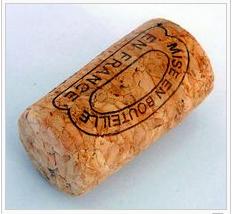
Sources and Harvesting: There are about 2,200,000 hectares of cork forest worldwide; 32.4% in Portugal, and 22.2% in Spain. Annual production is about 300,000 tons; 52.5% from Portugal, 29.5% from Spain, 5.5% Italy. Once the trees are about 25 years old the cork is stripped from the trunks every ten years. The trees live for about 200 years. The first two harvests produce poorer quality cork.
Properties and uses: Cork's elasticity combined with its near-impermeability makes it suitable as a material for bottle stoppers, especially for wine bottles. Cork stoppers represent about 60% of all cork based production.Cork's low density makes it a suitable material for fishing floats and buoys, as well as handles for fishing rods (as an alternative to neoprene).Sheets of cork, often the by-product of more lucrative stopper production, are used to make bulletin boards, and when used as floor tiles and other building materials, because it is a good insulator, it can reduce the energy required for heating. Granules of cork can also be mixed into concrete. The composites made by mixing cork granules and cement have lower thermal conductivity, lower density and good energy absorption. Some of the property ranges of the composites are density (400–1500 kg/m³), compressive strength (1–26 MPa) and flexural strength (0.5–4.0 MPa).
Use of Wine Bottle Closure: As late as the mid-17th century, French vintners did not use cork stoppers, using oil-soaked rags stuffed into the necks of bottles instead. Wine corks can be made of either a single piece of cork, or composed of particles, as in champagne corks; corks made of granular particles are called "technical corks".
While screwtops are generally considered to offer a trichloroanisole (TCA) free seal they reduce the oxygen transfer rate to almost zero, which can lead to reductive qualities in the wine. TCA is one of the primary causes of cork taint in wine. However, in recent years major cork producers have developed methods that remove most TCA from natural wine corks. Natural cork stoppers are important because they allow oxygen to interact with wine for proper aging, and are best suited for bold red wines purchased with the intent to age.
Cork Other Uses:
Although excessive alcohol consumption has adverse health effects, epidemiological studies have consistently demonstrated that moderate consumption of alcohol and wine is statistically associated with a decrease in death due to cardiovascular events such as heart failure. The average moderate wine drinker is more likely to exercise more, to be more health conscious, and to be of a higher educational and socioeconomic class, evidence that the association between moderate wine drinking and health may be related to confounding factors. Heavy drinkers have an elevated risk, while moderate drinkers (at most two five-ounce servings of wine per day) have a lower risk than non-drinkers. Red wine contains more polyphenols than white wine, and these are thought to be particularly protective against cardiovascular disease.
To fully get the benefits of resveratrol in wines, it is recommended to sip slowly when drinking wines. Due to inactivation in the gut and liver, most of the resveratrol in imbibed red wine does not reach the blood circulation. However, when sipping slowly, absorption via the mucous membranes in the mouth can result in up to around 100 times the blood levels of resveratrol. A study of women in the United Kingdom, called The Million Women Study, concluded that moderate alcohol consumption can increase the risk of certain cancers, including breast, pharynx and liver cancer.
Wines made from other fruits, such as apples and berries, are normally named after the fruit from which they are produced (for example, apple wine or elderberry wine) and are generically called fruit wine or country wine (not to be confused with the French term vin de pays). Others, such as barley wine and rice wine (i.e., sake), are made from starch-based materials and resemble beer and spirit more than wine, while ginger wine is fortified with brandy. In these cases, the term "wine" refers to the higher alcohol content rather than production process.The commercial use of the English word "wine" (and its equivalent in other languages) is protected by law in many jurisdictions.
Wine has a rich history dating back to around 8000 BC and is thought to have originated in areas now within the borders of Armenia, Georgia and Iran. Wine first appeared in Europe at about 4500 BC in the Balkans, and was very common in ancient Greece, Thrace and Rome. Wine has also played an important role in religion throughout history. The Greek god Dionysus and the Roman equivalent Bacchus represented wine, and the drink is also used in Christian Eucharist ceremonies and the Jewish Kiddush.
Etymology:
The English word "wine" comes from the Proto-Germanic "*winam," an early borrowing from the Latin vinum, "wine" or "(grape) vine," itself derived from the Proto-Indo-European stem *win-o-.
History:
Archaeological evidence suggests that the earliest known production of wine, made by fermenting grapes, took place in sites in Georgia and Armenia from as early as 8000-6000 BC. These locations are all within the natural area of the European grapevine Vitis vinifera. Pressing wine after the harvest; Tacuinum Sanitatis, 14th century.
The oldest known evidence of wine production in Europe is dated to 4500 BC and comes from archaeological sites in Greece. The same sites also contain the world's earliest evidence of crushed grapes.On January 11, 2011 in one of Armenia's Vayots Dzor province cave was found world’s oldest winery dating to approximately 6000 years ago.
Viticulture in India has a long history dating back to the time of the Indus Valley civilization when grapevines were believed to have been introduced from Persia sometime in the 5000 BC. The first known mentioning of grape-based wines was in the late 4th century BC writings of Chanakya who was the chief minister of Emperor Chandragupta Maurya. In his writings, Chanakya condemns the use of alcohol while chronicling the emperor and his court's frequent indulgence of a style of grape wine known as Madhu.
Archaeologists indicates a possibility that grapes were mixed with rice to produce mixed fermented beverages in China in the early years of the seventh millennium BC.
Grape Varities:
Wine is usually made from one or more varieties of the European species Vitis vinifera, such as Pinot Noir, Chardonnay, Cabernet Sauvignon, Gamay and Merlot. When one of these varieties is used as the predominant grape (usually defined by law as a minimum of 75% or 85%), the result is a varietal, as opposed to a blended, wine. Blended wines are not necessarily considered inferior to varietal wines; some of the world's most expensive wines, from regions like Bordeaux and the Rhone Valley, are blended from different grape varieties of the same vintage.
Wine can also be made from other species of grape or from hybrids, created by the genetic crossing of two species. Vitis labrusca (of which the Concord grape is a cultivar), Vitis aestivalis, Vitis rupestris, Vitis rotundifolia and Vitis riparia are native North American grapes usually grown to eat fresh or for grape juice, jam, or jelly, but sometimes made into wine.
Hybridization is different than grafting. Most of the world's vineyards are planted with European V. vinifera vines that have been grafted onto North American species rootstock. This is common practice because North American grape species are resistant to phylloxera, a root louse that eventually kills the vine. In the late 19th century, most of Europe's vineyards (only excluding some of the driest vineyards in Southern Europe) were devastated by the bug, leading to massive vine deaths and eventual replanting. Grafting is done in every wine-producing country of the world except for Argentina, the Canary Islands and Chile—the only countries not yet exposed to the insect.
In the context of wine production, terroir is a concept that encompasses the varieties of grapes used, elevation and shape of the vineyard, type and chemistry of soil, climate and seasonal conditions, and the local yeast cultures. The range of possibilities here can result in great differences between wines, influencing the fermentation, finishing, and aging processes as well. Many wineries use growing and production methods that preserve or accentuate the aroma and taste influences of their unique terroir. However, flavor differences are not desirable for producers of mass-market table wine or other cheaper wines, where consistency is more important. Such producers try to minimize differences in sources of grapes through production techniques such as micro-oxygenation, tannin filtration, cross-flow filtration, thin film evaporation, and spinning cones.
Acid in Wines:
The acids in wine are an important component in both winemaking and the finished product of wine. They are present in both grapes and wine, having direct influences on the color, balance and taste of the wine as well as the growth and vitality of yeasts during fermentation and protecting the wine from bacteria. Most wines having a pH between 2.9–3.9. Generally, the lower the pH, the higher the acidity in the wine. However, there is no direct connection between total acidity and pH (it is possible to find wines with a high pH for wine and high acidity). In wine tasting, the term “acidity” refers to the fresh, tart and sour attributes of the wine which is evaluated in relation to how well the acidity balances out the sweetness and bitter components of the wine such as tannins.

- Tartaric acid is, from a winemaking perspective, the most important in wine due to the prominent role it plays in maintaining the chemical stability of the wine and its color and finally in influencing the taste of the finished wine. In most plants, this organic acid is rare but it is found in significant concentrations in grape vines.
- Malic acid, along with tartaric acid, is one of the principal organic acids found in wine grapes. It is found in nearly every fruit and berry plant but its most often associated with green apples from which flavor it most readily projects in wine.
- Lactic Acid: A much milder acid than tartaric and malic, lactic acid is often associated with “milky” flavors in wine and is the primary acid of yogurt and sauerkraut. It is produced during winemaking by lactic acid bacteria (known as LAB) which includes three genera: Oenococcus, Pediococcus and Lactobacillus.
- Citric Acid: While very common in citrus fruits, such as limes, citric acid is found only in very minute quantities in wine grapes. It often has a concentration about 1/20 that of tartaric acid. The citric acid most commonly found in wine are commercially produced acid supplements derived from fermenting sucrose solutions.
- Acetic acid is a two-carbon fatty acid produced in wine during or after the fermentation period. It is the most volatile of the primary acids associated with wine and is responsible for the sour taste of vinegar. During fermentation, activity by yeast cells naturally produce a small amount of acetic acid. If the wine is exposed to oxygen, acetobacter bacteria will convert the ethanol alcohol into acetic acid.
- Ascorbic acid, also known as vitamin C, is found in young wine grapes prior to veraison but is rapidly lost throughout the ripening process. In winemaking it is used with sulfur dioxide as an anti-oxidant to prevent oxidation, often added during the bottling process for white wines.
- Butyric acid is a bacteria-induced wine fault that can cause a wine to smell of spoiled Camembert or rancid butter.
- Sorbic acid is a winemaking additive used often in sweet wines as a preservative against fungi, bacteria and yeast growth. Unlike sulfur dioxide, it does not hinder the growth of the lactic acid bacteria.
- Succinic acid is most commonly found in wine but can also be present in trace amounts in ripened grapes. While concentration varies amount grape varieties, it is usually found in higher levels with red wine grapes.
The acidity in wine is an important component in the quality and taste of the wine. It adds a sharpness to the flavors and is detected most readily by a prickling sensation on the sides of the tongue and a mouth watering after taste. Of particular importance is the balance of acidity versus the sweetness of the wine (the left over residual sugar) and the more bitter components of the wine (most notably tannins but also includes other phenolics). A wine with too much acidity will taste excessive sour and sharp. A wine with too little acidity will taste flabby, flat and with less defined flavors.
Classification:Regulations govern the classification and sale of wine in many regions of the world. European wines tend to be classified by region (e.g. Bordeaux, Rioja and Chianti), while non-European wines are most often classified by grape (e.g. Pinot Noir and Merlot). More and more, however, market recognition of particular regions is leading to their increased prominence on non-European wine labels. Examples of non-European recognized locales include Napa Valley in California, [[peth-dindori valley(wine)india], madhuca indica trible wine from peth |]Willamette Valley in Oregon, Columbia Valley in Washington, Barossa Valley and Hunter Valley in Australia, Central Valley in Chile, Vale dos Vinhedos in Brazil, Hawke's Bay and Marlborough in New Zealand, Okanagan Valley and Niagara Peninsula in Canada.
European Classification: France has various appellation systems based on the concept of terroir, with classifications ranging from Vin de Table ("table wine") at the bottom, through Vin de Pays and Appellation d'Origine Vin Délimité de Qualité Supérieure (AOVDQS) up to Appellation d'Origine Contrôlée (AOC) or similar, depending on the region. Portugal has something similar and, in fact, pioneered this technique in 1756 with a royal charter that created the "Demarcated Douro Region" and regulated wine production and trade.Germany did likewise in 2002, although their system has not yet achieved the authority of those of the other countries'. Spain, Greece and Italy have classifications based on a dual system of region of origin and product quality.
Beyond Europe: Wines from outside of the traditional wine growing regions of Europe tend to be classified by grape rather than by terroir or region of origin, although there have been non-official attempts to classify them by quality.
Vintages:A "vintage wine" is one made from grapes that were all or mostly grown in a particular year. Most countries allow a vintage wine to include a portion that is not from the labelled vintage. Variations in a wine's character from year to year can include subtle differences in color, palate, nose, body and development. High-quality wines can improve in flavor with age if properly stored.
In the United States, for a wine to be vintage dated and labeled with a country of origin or American Viticultural Area (AVA) (such as "Sonoma Valley"), it must contain at least 95% of its volume from grapes harvested in that year. If a wine is not labeled with a country of origin or AVA the percentage requirement is lowered to 85%.
Vintage wines are generally bottled in a single batch so that each bottle will have a similar taste. Climate can have a big impact on the character of a wine to the extent that different vintages from the same vineyard can vary dramatically in flavor and quality. Thus, vintage wines are produced to be individually characteristic of the vintage and to serve as the flagship wines of the producer. Superior vintages, from reputable producers and regions, will often fetch much higher prices than their average vintages. Some vintage wines, like Brunellos, are only made in better-than-average years.
Aging of Wine:
The aging of wine, and its ability to potentially improve in quality, distinguishes wine from most other consumable goods. While wine is perishable and capable of deteriorating, complex chemical reactions involving a wine's sugars, acids and phenolic compounds (such as tannins) can alter the aroma, color, mouthfeel and taste of the wine in a way that may be more pleasing to the taster. The ability of a wine to age is influenced by many factors including grape variety, vintage, viticultural practices, wine region and winemaking style. The condition that the wine is kept in after bottling can also influence how well a wine ages and may require significant time and financial investment.
What wine can age ?
Only a few wines have the ability to significantly improve with age. Only around the top 10% of all red wine and top 5% of all white wines can improve significantly enough with age to make drinking more enjoyable at 5 years of age than at 1 year of age. Only the top 1% of all wine has the ability to improve significantly after more than a decade. It is belief that more wine is consumed too old, rather than too young, and that the great majority of wines start to lose appeal and fruitiness after 6 months in the bottle.
Wine with Little or no aging potential: German QBAs, Asti and Moscato Spumante, Rosé and blush wines like White Zinfandel, Branded wines like Yellow Tail, Mouton Cadet, European table wine, American jug & box wine, Inexpensive varietals (with the possible exception of Cabernet Sauvignon), The majority of Vin de pays, All Nouveau wines, Vermouth, Basic Sherry, Ports etc.
Wines with some aging potential: Botrytized wines (5–25 yrs), Chardonnay (2–6 yrs), Riesling (2–30 yrs), Hungarian Furmint (3–25 yrs), Loire Valley Chenin blanc (4–30 yrs), Hunter Valley Semillon (6–15 yrs), Cabernet Sauvignon (4–20 yrs), Merlot (2–10 yrs), Nebbiolo (4–20 yrs), Pinot noir (2–8 yrs), Sangiovese (2–8 yrs), Syrah (4–16 yrs), Zinfandel (2–6 yrs), Classified Bordeaux (8–25 yrs), Grand Cru Burgundy (8–25 yrs), Aglianico from Taurasi (4–15 yrs), Baga from Bairrada (4–8 yrs), Hungarian Kadarka (3–7 yrs), Bulgarian Melnik (3–7 yrs), Croatian Plavac Mali (4–8 yrs), Russian Saperavi (3–10 yrs), Madiran Tannat (4–12 yrs), Spanish Tempranillo (2–8 yrs), Greek Xynomavro (4–10 yrs) etc.
During the aging process, the perception of a wine's acidity may change even though the total measurable amount of acidity is more or less constant throughout a wine's life. This is due to the esterification of the acids, combining with alcohols in complex array to form esters. In addition to making a wine taste less acidic, these esters introduce a range of possible aromas. Eventually the wine may age to a point where other components of the wine (such as a tannins and fruit) are less noticeable themselves, which will then bring back a heightened perception of wine acidity. Other chemical processes that occur during aging include the hydrolysis of flavor precursors which detach themselves from glucose molecules and introduce new flavor notes in the older wine and Aldehydes become oxidized. The interaction of certain phenolics develop what is known as tertiary aromas which are different from the primary aromas that are derived from the grape and during fermentation. An aged Malmsey Madeira shows the color change that white wines goes through as they age.
As a wine starts to mature, its bouquet will become more developed and multi-layered. While a taster may be able to pick out a few fruit notes in a young wine, a more complex wine will have several distinct fruit, floral, earthy, mineral and oak derived notes. The lingering finish of a wine will lengthen. Eventually the wine will reach a point of maturity, when it is said to be at its "peak". This is the point when the wine has the maximum amount of complexity, most pleasing mouthfeel and softening of tannins and has not yet started to decay. When this point will occur is not yet predictable and can vary from bottle to bottle. If a wine is aged for too long, it will start to descend into decrepitude where the fruit tastes hollow and weak while the wine's acidity becomes dominant.
The natural esterification that takes place in wines and other alcoholic beverages during the aging process is an example of acid-catalysed esterification. Over time, the acidity of the acetic acid and tannins in an aging wine will catalytically protonate other organic acids (including acetic acid itself), encouraging ethanol to react as a nucleophile. As a result, ethyl acetate -- the ester of ethanol and acetic acid—is the most abundant ester in wines. Other combinations of organic alcohols (such as phenol-containing compounds) and organic acids lead to a variety of different esters in wines, contributing to their different flavours, smells and tastes. Of course, when compared to sulfuric acid conditions, the acid conditions in a wine are mild, so yield is low (often in tenths or hundredths of a percentage point by volume) and take years for ester to accumulate.
Factors And Infuence - Wine Aging:
The ratio of sugars, acids and phenolics to water is a key determination of how well a wine can age. The less water in the grapes prior to harvest, the more likely the resulting wine will have some aging potential. Grape variety, climate, vintage and viticultural practice come into play here. Grape varieties with thicker skins, from a dry growing season where little irrigation was used and yields were kept low will have less water and a higher ratio of sugar, acids and phenolics. The process of making Eisweins, where water is removed from the grape during pressing as frozen ice crystals, has a similar effect of decreasing the amount of water and increasing aging potential.
In winemaking, the duration of maceration or skin contact will influence how much phenolic compounds are leached from skins into the wine. Pigmented tannins, anthocyanins, colloids, tannin-polysaccharides and tannin-proteins not only influence a wine's resulting color but also act as preservatives. During fermentation adjustment to a wine's acid levels can be made with wines with lower pH having more aging potential. Exposure to oak either during fermentation or after during barrel aging will introduce more phenolic compounds to the wines. Prior to bottling, excessive fining or filtering of the wine could strip the wine of some phenolic solids and may lessen a wine's ability to age.
Storage conditions can influence a wine's aging ability: The storage condition of the bottled wine will influence a wine's aging. Vibrations and heat fluctuations can hasten a wine's deterioration and cause adverse effect on the wines. In general, a wine has a greater potential to develop complexity and more aromatic bouquet if it is allowed to age slowly in a relatively cool environment. The lower the temperature, the more slowly a wine develops. On average, the rate of chemical reactions in wine double with each 18 °F (8 °C) increase in temperature. Wine expert Karen MacNeil, recommends keeping wine intended for aging in a cool area with a constant temperature around 55°F (13°C). Wine can be stored at temperatures as high as 69°F (20°C) without long term negative effect. Professor Cornelius Ough of the University of California, Davis believes that wine could be exposed to temperatures as high as 120 °F (49 °C) for a few hours and not be damaged. However, most experts believe that extreme temperature fluctuations (such as repeated transferring a wine from a warm room to a cool refrigerator) would be detrimental to the wine. The ultra-violet rays of direct sunlight should also be avoided because of the free radicals that can develop in the wine and result in oxidation.
Wines packaged in large format bottles, such as magnums and 3 liter Jeroboams, seem to age more slowly than wines packaged in regular 750 ml bottles or half bottles. This may be because of the greater proportion of oxygen exposed to the wine during the bottle process. The advent of alternative wine closures to cork, such as screw caps and synthetic corks have opened up recent discussions on the aging potential of wines sealed with these alternative closures. Currently there are no conclusive results and the topic is the subject of ongoing research.
Bottle Sickness: One of the short-term aging needs of wine is a period where the wine is considered "sick" due to the trauma and volatility of the bottling experience. During bottling some oxygen is exposed to the wine, causing a domino effect of chemical reaction with various components of the wine. The time it takes for the wine to settle down and have the oxygen fully dissolve and integrate with the wine is considered its period of "bottle shock". During this time the wine could taste drastically different than it did prior to bottling or how it will taste after the wine has settled. While many modern bottling lines try to treat the wine as gently as possible and utilize inert gases to minimize the amount of oxygen exposure, all wine goes through some period of bottle shock. The length of this period will vary with each individual wine.
Dumb Phase: During the course of aging a wine may slip into a "dumb phase" where its aromas and flavors are very muted. In Bordeaux this phase is called the age ingrat or "difficult age" and is likened to a teenager going through adolescence. The cause or length of time that this "dumb phase" will last is not yet fully understood and seems to vary from bottle to bottle.
Wine Tasting:Wine tasting is the sensory examination and evaluation of wine. Wines are made up of chemical compounds similar or identical to those in fruits, vegetables, and spices. The sweetness of wine is determined by the amount of residual sugar in the wine after fermentation, relative to the acidity present in the wine. Dry wine, for example, has only a small amount of residual sugar.
Individual flavors may also be detected, due to the complex mix of organic molecules such as esters and terpenes that grape juice and wine can contain. Experienced tasters can distinguish between flavors characteristic of a specific grape and flavors that result from other factors in wine making. Typical intentional flavor elements in wine are those imparted by aging in oak casks; chocolate, vanilla, or coffee almost always come from the oak and not the grape itself.
Banana flavors (isoamyl acetate) are the product of yeast metabolism, as are spoilage aromas such as sweaty, barnyard, band-aid (4-ethylphenol and 4-ethylguaiacol), and rotten egg (hydrogen sulfide). Some varietals can also have a mineral flavor due to the presence of water-soluble salts (like limestone).
Wine aroma comes from volatile compounds in the wine that are released into the air. Vaporization of these compounds can be sped up by twirling the wine glass or serving the wine at room temperature. For red wines that are already highly aromatic, like Chinon and Beaujolais, many people prefer them chilled.
Collecting:Outstanding vintages from the best vineyards may sell for thousands of dollars per bottle, though the broader term fine wine covers bottles typically retailing at over about US$30–50. "Investment wines" are considered by some to be Veblen goods—that is, goods for which demand increases instead of decreases as its price rises. The most common wines purchased for investment include those from Bordeaux, Burgundy, cult wines from Europe and elsewhere, and Vintage port. Characteristics of highly collectible wines include:
- A proven track record of holding well over time
- A drinking window plateau (i.e., the period for maturity and approachability) that is many years long.
- A consensus amongst experts as to the quality of the wines.
- Rigorous production methods at every stage, including grape selection and appropriate barrel-aging
Uses:Wine is a popular and important beverage that accompanies and enhances a wide range of European and Mediterranean-style cuisines. Red, white, and sparkling wines are the most popular, and are known as light wines because they are only 10–14% alcohol-content by volume. Apéritif and dessert wines contain 14–20% alcohol, and are sometimes fortified to make them richer and sweeter.
Some wine labels suggest opening the bottle and letting the wine "breathe" for a couple of hours before serving, while others recommend drinking it immediately. Decanting—the act of pouring a wine into a special container just for breathing—is a controversial subject in wine. In addition to aeration, decanting with a filter allows one to remove bitter sediments that may have formed in the wine. Sediment is more common in older bottles but younger wines usually benefit more from aeration.
During aeration, the exposure of younger wines to air often "relaxes" the flavors and makes them taste smoother and better integrated in aroma, texture, and flavor. Older wines generally fade, or lose their character and flavor intensity, with extended aeration. Despite these general rules, breathing does not necessarily benefit all wines. Wine should be tasted as soon as it is opened to determine how long it should be aerated, if at all.
Religious Uses:
Ancient Religion: The use of wine in religious ceremonies is common to many cultures and regions. Libations often included wine, and the religious mysteries of Dionysus used wine as a sacramental entheogen to induce a mind-altering state.
Judaism: Wine is an integral part of Jewish laws and traditions. The Kiddush is a blessing recited over wine or grape juice to sanctify the Shabbat or a Jewish holiday. On Pesach (Passover) during the Seder, it is a Rabbinic obligation of men and women to drink four cups of wine. In the Tabernacle and in the Temple in Jerusalem, the libation of wine was part of the sacrificial service. The blessing over wine said before consuming the drink is: "Baruch atah Hashem (Adonai) Eloheinu melech ha-olam, boray p’ree hagafen"—"Praised be the Lord, our God, King of the universe, Creator of the fruit of vine."
Christianity: In Christianity, wine is used in a sacred rite called the Eucharist, which originates in the Gospel account of the Last Supper (Gospel of Luke 22:19) that describe Jesus sharing bread and wine with his disciples and commanding them to, "do this in remembrance of me." Beliefs about the nature of the Eucharist vary among denominations .
Packaging: Most wines are sold in glass bottles and are sealed using corks (50% of production comes from Portugal). An increasing number of wine producers have been using alternative closures such as screwcaps, or synthetic plastic "corks". In addition to being less expensive, alternative closures prevent cork taint, although they have been blamed for other problems such as excessive reduction.
Some wines are packaged in heavy plastic bags within cardboard boxes, and are called box wines, or cask wine. These wines are typically accessed via a tap on the side of the box. Box wine can stay acceptably fresh for up to a month after opening, while bottled wine oxidizes more rapidly and can degrade considerably in a few days.
Environmental considerations of wine packaging reveal benefits and drawbacks of both bottled and box wines. Glass used to make bottles has a decent environmental impact, as it is completely recyclable, whereas plastics as used in box wines are typically much less environmentally friendly. However, wine bottle manufacturers have been cited for Clean Air Act violations. A New York Times editorial suggested that box wine, being lighter in package weight, has a reduced carbon footprint from its distribution. Boxed wine plastics, even though possibly recyclable, can be more labor-intensive (and therefore expensive) to process than glass bottles. And, while a wine box is recyclable, its plastic wine bladder most likely is not.
Storage:
Wine cellars, or wine rooms if they are above-ground, are places designed specifically for the storage and aging of wine. In an active wine cellar, temperature and humidity are maintained by a climate control system. Passive wine cellars are not climate-controlled, and so must be carefully located. Wine is a natural, perishable food product; when exposed to heat, light, vibration or fluctuations in temperature and humidity, all types of wine, including red, white, sparkling, and fortified, can spoil. When properly stored, wines can maintain their quality and in some cases improve in aroma, flavor, and complexity as they age. Some wine experts contend that the optimal temperature for aging wine is 55 °F (13 °C), others 59 °F (15 °C). Wine refrigerators offer an alternative to wine cellars. Wine refrigerators are not ideal for aging, but rather serve to chill wine to the perfect temperature for drinking. These refrigerators keep the humidity low, usually under 50%, which is below the optimal humidity of 50% to 70%. Lower humidity levels can dry corks out over time, allowing oxygen to enter the bottle and reduce the wine's quality.
Wine (s) bottle stopper "CORK" [Cork Collecting hobby]Cork is an impermeable, buoyant material, a prime-subset of generic cork tissue that is harvested for commercial use primarily from Quercus suber (the Cork Oak), which is endemic to southwest Europe and northwest Africa. Cork is composed of suberin, a hydrophobic substance, and because of its impermeability, buoyancy, elasticity, and fire resistance, it is used in a variety of products, the most common of which is for wine stoppers. Portugal produces approximately 50% of cork harvested annually worldwide, with Corticeira Amorim being the leading company in the industry
Sources and Harvesting: There are about 2,200,000 hectares of cork forest worldwide; 32.4% in Portugal, and 22.2% in Spain. Annual production is about 300,000 tons; 52.5% from Portugal, 29.5% from Spain, 5.5% Italy. Once the trees are about 25 years old the cork is stripped from the trunks every ten years. The trees live for about 200 years. The first two harvests produce poorer quality cork.
Properties and uses: Cork's elasticity combined with its near-impermeability makes it suitable as a material for bottle stoppers, especially for wine bottles. Cork stoppers represent about 60% of all cork based production.Cork's low density makes it a suitable material for fishing floats and buoys, as well as handles for fishing rods (as an alternative to neoprene).Sheets of cork, often the by-product of more lucrative stopper production, are used to make bulletin boards, and when used as floor tiles and other building materials, because it is a good insulator, it can reduce the energy required for heating. Granules of cork can also be mixed into concrete. The composites made by mixing cork granules and cement have lower thermal conductivity, lower density and good energy absorption. Some of the property ranges of the composites are density (400–1500 kg/m³), compressive strength (1–26 MPa) and flexural strength (0.5–4.0 MPa).
Use of Wine Bottle Closure: As late as the mid-17th century, French vintners did not use cork stoppers, using oil-soaked rags stuffed into the necks of bottles instead. Wine corks can be made of either a single piece of cork, or composed of particles, as in champagne corks; corks made of granular particles are called "technical corks".
While screwtops are generally considered to offer a trichloroanisole (TCA) free seal they reduce the oxygen transfer rate to almost zero, which can lead to reductive qualities in the wine. TCA is one of the primary causes of cork taint in wine. However, in recent years major cork producers have developed methods that remove most TCA from natural wine corks. Natural cork stoppers are important because they allow oxygen to interact with wine for proper aging, and are best suited for bold red wines purchased with the intent to age.
Cork Other Uses:
- Cork is used in musical instruments, particularly woodwind instruments, where it is used to fasten together segments of the instrument, making the seams airtight. Conducting baton handles are also often made out of cork.
- Cork can be used as bricks for the outer walls of houses, as in Portugal's pavilion at Expo 2000.
- Cork is used as the core of both baseballs and cricket balls. Replacing the interior of a baseball bat with cork—a practice known as corking — was historically a method of cheating at baseball; the efficacy of the practice is now discredited.
- Cork is often used, in various forms, in spacecraft heat shields.
- Cork is also used inside footwear to improve climate control and comfort.
- Corks are also hung from hats to keep insects away. See cork hat.
- Cork has been used as a core material in sandwich composite construction.
- Cork can be used as the friction lining material of an automatic transmission clutch, as designed in certain mopeds.
Although excessive alcohol consumption has adverse health effects, epidemiological studies have consistently demonstrated that moderate consumption of alcohol and wine is statistically associated with a decrease in death due to cardiovascular events such as heart failure. The average moderate wine drinker is more likely to exercise more, to be more health conscious, and to be of a higher educational and socioeconomic class, evidence that the association between moderate wine drinking and health may be related to confounding factors. Heavy drinkers have an elevated risk, while moderate drinkers (at most two five-ounce servings of wine per day) have a lower risk than non-drinkers. Red wine contains more polyphenols than white wine, and these are thought to be particularly protective against cardiovascular disease.
To fully get the benefits of resveratrol in wines, it is recommended to sip slowly when drinking wines. Due to inactivation in the gut and liver, most of the resveratrol in imbibed red wine does not reach the blood circulation. However, when sipping slowly, absorption via the mucous membranes in the mouth can result in up to around 100 times the blood levels of resveratrol. A study of women in the United Kingdom, called The Million Women Study, concluded that moderate alcohol consumption can increase the risk of certain cancers, including breast, pharynx and liver cancer.
Sunday, February 13, 2011
BEER
BEER is the world's most widely consumed and probably the oldest of alcoholic beverages; it is the third most popular drink overall, after water and tea.
It is produced by the brewing and fermentation of starches, mainly derived from cereal grains—most commonly malted barley, although wheat, maize (corn), and rice are widely used. Most beer is flavoured with hops, which add bitterness and act as a natural preservative, though other flavourings such as herbs or fruit may occasionally be included.
The strength of beer is usually around 4% to 6% alcohol by volume (abv) though may range from less than 1% abv, to over 20% abv in rare cases. The current world record is held by BrewDog, a Scottish craft brewery who brewed End of History in 2010; a freeze-distilled beer coming in at 55% ABV. It is also one of the most expensive costing between £500 and £700 ($800 - $1000; US) each 12 oz bottle.
Top-fermented beers are most commonly produced with Saccharomyces cerevisiae which clumps and rises to the surface, typically between 15 and 24 °C (60 and 75 °F). At these temperatures, yeast produces significant amounts of esters and other secondary flavour and aroma products, and the result is often a beer with slightly "fruity" compounds resembling apple, pear, pineapple, banana, plum, or prune, among others.
As almost any substance containing carbohydrates, mainly sugars or starch, can naturally undergo fermentation, it is likely that beer-like beverages were independently invented among various cultures throughout the world. The invention of bread and beer has been argued to be responsible for humanity's ability to develop technology and build civilization.
Process:
The process of making beer is known as brewing. A dedicated building for the making of beer is called a brewery, though beer can be made in the home. The purpose of brewing is to convert the starch source into a sugary liquid called wort and to convert the wort into the alcoholic beverage known as beer in a fermentation process effected by yeast.

The first step, where the wort is prepared by mixing the starch source (normally malted barley) with hot water, is known as "mashing". Hot water (known as "liquor" in brewing terms) is mixed with crushed malt or malts (known as "grist") in a mash tun. The mashing process takes around 1 to 2 hours, during which the starches are converted to sugars, and then the sweet wort is drained off the grains. The grains are now washed in a process known as "sparging". This washing allows the brewer to gather as much of the fermentable liquid from the grains as possible. The process of filtering the spent grain from the wort and sparge water is called wort separation. The traditional process for wort separation is lautering, in which the grain bed itself serves as the filter medium. Some modern breweries prefer the use of filter frames which allow a more finely ground grist. Most modern breweries use a continuous sparge, collecting the original wort and the sparge water together. However, it is possible to collect a second or even third wash with the not quite spent grains as separate batches. Each run would produce a weaker wort and thus a weaker beer. This process is known as second (and third) runnings. Brewing with several runnings is called parti gyle brewing.
The sweet wort collected from sparging is put into a kettle, or "copper", (so called because these vessels were traditionally made from copper) and boiled, usually for about one hour. During boiling, water in the wort evaporates, but the sugars and other components of the wort remain; this allows more efficient use of the starch sources in the beer. Boiling also destroys any remaining enzymes left over from the mashing stage. Hops are added during boiling as a source of bitterness, flavour and aroma. Hops may be added at more than one point during the boil. The longer the hops are boiled, the more bitterness they contribute, but the less hop flavour and aroma remains in the beer.
After boiling, the hopped wort is now cooled, ready for the yeast. In some breweries, the hopped wort may pass through a hopback, which is a small vat filled with hops, to add aromatic hop flavouring and to act as a filter; but usually the hopped wort is simply cooled for the fermenter, where the yeast is added. During fermentation, the wort becomes beer in a process which requires a week to months depending on the type of yeast and strength of the beer. In addition to producing alcohol, fine particulate matter suspended in the wort settles during fermentation. Once fermentation is complete, the yeast also settles, leaving the beer clear.
Fermentation is sometimes carried out in two stages, primary and secondary. Once most of the alcohol has been produced during primary fermentation, the beer is transferred to a new vessel and allowed a period of secondary fermentation[disambiguation needed]. Secondary fermentation is used when the beer requires long storage before packaging or greater clarity. When the beer has fermented, it is packaged either into casks for cask ale or kegs, aluminium cans, or bottles for other sorts of beer.
Ingredients:
The basic ingredients of beer are water; a starch source, such as malted barley, able to be fermented (converted into alcohol); a brewer's yeast to produce the fermentation; and a flavouring such as hops. A mixture of starch sources may be used, with a secondary starch source, such as maize (corn), rice or sugar, often being termed an adjunct, especially when used as a lower-cost substitute for malted barley. Less widely used starch sources include millet, sorghum and cassava root in Africa, potato in Brazil, and agave in Mexico, among others. The amount of each starch source in a beer recipe is collectively called the grain bill.
1. Water:
Beer is composed mostly of water. Regions have water with different mineral components; as a result, different regions were originally better suited to making certain types of beer, thus giving them a regional character. For example, Dublin has hard water well suited to making stout, such as Guinness; while Pilzen has soft water well suited to making pale lager, such as Pilsner Urquell. The waters of Burton in England contain gypsum, which benefits making pale ale to such a degree that brewers of pale ales will add gypsum to the local water in a process known as Burtonisation.
2. Starch Source:
The starch source in a beer provides the fermentable material and is a key determinant of the strength and flavour of the beer. The most common starch source used in beer is malted grain. Grain is malted by soaking it in water, allowing it to begin germination, and then drying the partially germinated grain in a kiln. Malting grain produces enzymes that convert starches in the grain into fermentable sugars. Different roasting times and temperatures are used to produce different colours of malt from the same grain. Darker malts will produce darker beers.Nearly all beer includes barley malt as the majority of the starch. This is because of its fibrous husk, which is not only important in the sparging stage of brewing (in which water is washed over the mashed barley grains to form the wort), but also as a rich source of amylase, a digestive enzyme which facilitates conversion of starch into sugars. Other malted and unmalted grains (including wheat, rice, oats, and rye, and less frequently, corn and sorghum) may be used. In recent years, a few brewers have produced gluten-free beer made with sorghum with no barley malt for those who cannot consume gluten-containing grains like wheat, barley, and rye.
3. Hops:
Flavouring beer is the sole major commercial use of hops. The flower of the hop vine is used as a flavouring and preservative agent in nearly all beer made today. The flowers themselves are often called "hops". Hops were used by monastery breweries, such as Corvey in Westphalia, Germany, from AD 822, though the date normally given for widespread cultivation of hops for use in beer is the thirteenth century. Before the thirteenth century, and until the sixteenth century, during which hops took over as the dominant flavouring, beer was flavoured with other plants; for instance, Glechoma hederacea. Combinations of various aromatic herbs, berries, and even ingredients like wormwood would be combined into a mixture known as gruit and used as hops are now used. Some beers today, such as Fraoch' by the Scottish Heather Ales company and Cervoise Lancelot by the French Brasserie-Lancelot company, use plants other than hops for flavouring. Hops contain several characteristics that brewers desire in beer. Hops contribute a bitterness that balances the sweetness of the malt; the bitterness of beers is measured on the International Bitterness Units scale. Hops contribute floral, citrus, and herbal aromas and flavours to beer. Hops have an antibiotic effect that favours the activity of brewer's yeast over less desirable microorganisms, and hops aids in "head retention", the length of time that a foamy head created by carbonation will last. The acidity of hops is a preservative. Yeast is the microorganism that is responsible for fermentation in beer. Yeast metabolises the sugars extracted from grains, which produces alcohol and carbon dioxide, and thereby turns wort into beer. In addition to fermenting the beer, yeast influences the character and flavour. The dominant types of yeast used to make beer are the top-fermenting Saccharomyces cerevisiae and bottom-fermenting Saccharomyces uvarum. Brettanomyces ferments lambics, and Torulaspora delbrueckii ferments Bavarian weissbier. Before the role of yeast in fermentation was understood, fermentation involved wild or airborne yeasts. A few styles such as lambics rely on this method today, but most modern fermentation adds pure yeast cultures.
4. Clarifying Agent:
Some brewers add one or more clarifying agents to beer, which typically precipitate (collect as a solid) out of the beer along with protein solids and are found only in trace amounts in the finished product. This process makes the beer appear bright and clean, rather than the cloudy appearance of ethnic and older styles of beer such as wheat beers.
Examples of clarifying agents include isinglass, obtained from swimbladders of fish; Irish moss, a seaweed; kappa carrageenan, from the seaweed Kappaphycus cottonii; Polyclar (artificial); and gelatin. If a beer is marked "suitable for Vegans", it was clarified either with seaweed or with artificial agents
Varieits:
Pale Ale: Pale ale is a beer which uses a top-fermenting yeast and predominantly pale malt. It is one of the world's major beer styles.
Stout: Stout and porter are dark beers made using roasted malts or roast barley, and typically brewed with slow fermenting yeast. There are a number of variations including Baltic porter, dry stout, and Imperial stout. The name Porter was first used in 1721 to describe a dark brown beer popular with the street and river porters of London.This same beer later also became known as stout, though the word stout had been used as early as 1677. The history and development of stout and porter are intertwined.
Mild: Mild ale has a predominantly malty palate. It is usually dark coloured with an abv of 3% to 3.6%, although there are lighter hued milds as well as stronger examples reaching 6% abv and higher.
Wheat: Wheat beer is brewed with a large proportion of wheat although it often also contains a significant proportion of malted barley. Wheat beers are usually top-fermented (in Germany they have to be by law). The flavour of wheat beers varies considerably, depending upon the specific style.
Lager: Lager is the English name for cool fermenting beers of Central European origin. Pale lagers are the most commonly consumed beers in the world. The name "lager" comes from the German "lagern" for "to store", as brewers around Bavaria stored beer in cool cellars and caves during the warm summer months. These brewers noticed that the beers continued to ferment, and to also clear of sediment, when stored in cool conditions.
Lager yeast is a cool bottom-fermenting yeast (Saccharomyces pastorianus) and typically undergoes primary fermentation at 7–12 °C (45–54 °F) (the fermentation phase), and then is given a long secondary fermentation at 0–4 °C (32–39 °F) (the lagering phase). During the secondary stage, the lager clears and mellows. The cooler conditions also inhibit the natural production of esters and other byproducts, resulting in a "cleaner"-tasting beer.
Modern methods of producing lager were pioneered by Gabriel Sedlmayr the Younger, who perfected dark brown lagers at the Spaten Brewery in Bavaria, and Anton Dreher, who began brewing a lager (now known as Vienna lager), probably of amber-red colour, in Vienna in 1840–1841. With improved modern yeast strains, most lager breweries use only short periods of cold storage, typically 1–3 weeks.
Lambic: Lambic, a beer of Belgium, is naturally fermented using wild yeasts, rather than cultivated. Many of these are not strains of brewer's yeast (Saccharomyces cerevisiae) and may have significant differences in aroma and sourness. Yeast varieties such as Brettanomyces bruxellensis and Brettanomyces lambicus are common in lambics. In addition, other organisms such as Lactobacillus bacteria produce acids which contribute to the sourness.
Measurements:
Beer is measured and assessed by bitterness, by strength and by colour. The perceived bitterness is measured by the International Bitterness Units scale (IBU), defined in co-operation between the American Society of Brewing Chemists and the European Brewery Convention. The international scale was a development of the European Bitterness Units scale, often abbreviated as EBU, and the bitterness values should be identical.
Color:
Beer colour is determined by the malt. The most common colour is a pale amber produced from using pale malts. Pale lager and pale ale are terms used for beers made from malt dried with coke. Coke was first used for roasting malt in 1642, but it was not until around 1703 that the term pale ale was used. In terms of sales volume, most of today's beer is based on the pale lager brewed in 1842 in the town of Pilsen in the present-day Czech Republic. The modern pale lager is light in colour with a noticeable carbonation (fizzy bubbles) and a typical alcohol by volume content of around 5%. The Pilsner Urquell, Bitburger, and Heineken brands of beer are typical examples of pale lager, as are the American brands Budweiser, Coors, and Miller.
Dark beers are usually brewed from a pale malt or lager malt base with a small proportion of darker malt added to achieve the desired shade. Other colourants—such as caramel—are also widely used to darken beers. Very dark beers, such as stout, use dark or patent malts that have been roasted longer. Some have roasted unmalted barley.
Strength:
Beer ranges from less than 3% alcohol by volume (abv) to around 14% abv, though this strength can be increased to around 20% by re-pitching with champagne yeast, and to 55% abv by the freeze-distilling process. The alcohol content of beer varies by local practice or beer style. The pale lagers that most consumers are familiar with fall in the range of 4–6%, with a typical abv of 5%. The customary strength of British ales is quite low, with many session beers being around 4% abv. Some beers, such as table beer are of such low alcohol content (1%–4%) that they are served instead of soft drinks in some schools.
The alcohol in beer comes primarily from the metabolism of sugars that are produced during fermentation. The quantity of fermentable sugars in the wort and the variety of yeast used to ferment the wort are the primary factors that determine the amount of alcohol in the final beer. Additional fermentable sugars are sometimes added to increase alcohol content, and enzymes are often added to the wort for certain styles of beer (primarily "light" beers) to convert more complex carbohydrates (starches) to fermentable sugars. Alcohol is a by-product of yeast metabolism and is toxic to the yeast; typical brewing yeast cannot survive at alcohol concentrations above 12% by volume. Low temperatures and too little fermentation time decreases the effectiveness of yeasts and consequently decreases the alcohol content.
Exceptionally Strong Beers:
The strength of beers has climbed during the later years of the 20th century. Vetter 33, a 10.5% abv (33 degrees Plato, hence Vetter "33") doppelbock, was listed in the 1994 Guinness Book of World Records as the strongest beer at that time, though Samichlaus, by the Swiss brewer Hürlimann, had also been listed by the Guinness Book of World Records as the strongest at 14% abv. Since then, some brewers have used champagne yeasts to increase the alcohol content of their beers. Samuel Adams reached 20% abv with Millennium, and then surpassed that amount to 25.6% abv with Utopias. The strongest beer brewed in Britain was Baz's Super Brew by Parish Brewery, a 23% abv beer.
The product claimed to be the strongest beer made is The End of History, a 55% Belgian ale, made by the Scottish brewery BrewDog in 2010, who also made Sink The Bismarck!, a 41% abv IPA, and Tactical Nuclear Penguin, a 32% abv Imperial Stout; these are made using the eisbock method of fractional freezing, in which a strong ale is partially frozen and the ice is repeatedly removed, until the desired strength is reached, a process that may class the product as spirits rather than beer. The German brewery Schorschbräu's Schorschbock, a 31% abv eisbock, and Hair of the Dog's Dave, a 29% abv barley wine made in 1994, used the same fractional freezing method. A 60% abv blend of beer with whiskey was jokingly claimed as the strongest beer by a Dutch brewery in July 2010.
Serving:
Draught:Draught beer from a pressurised keg is the most common method of dispensing in bars around the world. A metal keg is pressurised with carbon dioxide (CO2) gas which drives the beer to the dispensing tap or faucet. Some beers may be served with a nitrogen/carbon dioxide mixture. Nitrogen produces fine bubbles, resulting in a dense head and a creamy mouthfeel. Some types of beer can also be found in smaller, disposable kegs called beer balls.
Packaging: Most beers are cleared of yeast by filtering when packaged in bottles and cans. However, bottle conditioned beers retain some yeast—either by being unfiltered, or by being filtered and then reseeded with fresh yeast. It is usually recommended that the beer be poured slowly, leaving any yeast sediment at the bottom of the bottle. However, some drinkers prefer to pour in the yeast; this practice is customary with wheat beers. Typically, when serving a hefeweizen, 90% of the contents are poured, and the remainder is swirled to suspend the sediment before pouring it into the glass. Alternatively, the bottle may be inverted prior to opening. Glass bottles are always used for bottle conditioned beers.
Temperature:
The temperature of a beer has an influence on a drinker's experience; warmer temperatures reveal the range of flavours in a beer but cooler temperatures are more refreshing. Most drinkers prefer pale lager to be served chilled, a low- or medium-strength pale ale to be served cool, while a strong barley wine or imperial stout to be served at room temperature.
Beer writer Michael Jackson proposed a five-level scale for serving temperatures: well chilled (7 °C/45 °F) for "light" beers (pale lagers); chilled (8 °C/46 °F) for Berliner Weisse and other wheat beers; lightly chilled (9 °C/48 °F) for all dark lagers, altbier and German wheat beers; cellar temperature (13 °C/55 °F) for regular British ale, stout and most Belgian specialities; and room temperature (15.5 °C/59.9 °F) for strong dark ales (especially trappist beer) and barley wine.
Vessels:
Beer is consumed out of a variety of vessels, such as a glass, a beer stein, a mug, a pewter tankard, a beer bottle or a can. The shape of the glass from which beer is consumed can influence the perception of the beer and can define and accent the character of the style. Breweries offer branded glassware intended only for their own beers as a marketing promotion, as this increases sales.
The pouring process has an influence on a beer's presentation. The rate of flow from the tap or other serving vessel, tilt of the glass, and position of the pour (in the centre or down the side) into the glass all influence the end result, such as the size and longevity of the head, lacing (the pattern left by the head as it moves down the glass as the beer is drunk), and turbulence of the beer and its release of carbonation.
Health Effect:
The main active ingredient of beer is alcohol, and therefore, the health effects of alcohol apply to beer. The moderate consumption of alcohol, including beer, is associated with a decreased risk of cardiac disease, stroke and cognitive decline.
The long term health effects of continuous, heavy alcohol consumption can, however, include the risk of developing alcoholism and alcoholic liver disease.
Brewer's yeast is known to be a rich source of nutrients; therefore, as expected, beer can contain significant amounts of nutrients, including magnesium, selenium, potassium, phosphorus, biotin, and B vitamins. In fact, beer is sometimes referred to as "liquid bread". Some sources maintain that filtered beer loses much of its nutrition.
A 2005 Japanese study found that low alcohol beer may possess strong anti-cancer properties. Another study found nonalcoholic beer to mirror the cardiovascular benefits associated with moderate consumption of alcoholic beverages. However, much research suggests that the primary health benefit from alcoholic beverages comes from the alcohol they contain.

It is considered that overeating and lack of muscle tone is the main cause of a beer belly, rather than beer consumption. A recent study, however, found a link between binge drinking and a beer belly. But with most overconsumption, it is more a problem of improper exercise and overconsumption of carbohydrates than the product itself. Several diet books quote beer as having an undesirably high glycemic index of 110, the same as maltose; however, the maltose in beer undergoes metabolism by yeast during fermentation so that beer consists mostly of water, hop oils and only trace amounts of sugars, including maltose.
Wednesday, January 26, 2011
Web Service Security - Auth Sign Encrypt
Overview of Web Services Security
To secure your WebLogic Web Service, you configure one or more of three different types of security:
- Message-level security, in which data in a SOAP message is digitally signed or encrypted.
- Transport-level security, in which SSL is used to secure the connection between a client application and the Web Service.
- Access control security, which specifies which roles are allowed to access Web Services.
What Type of Security Should You Configure?
Access control security answers the question "who can do what?" First you specify the roles that are allowed to access a Web Service. Then, when a client application attempts to invoke a Web Service operation, the client authenticates itself to WebLogic Server, and if the client has the authorization, it is allowed to continue with the invocation. Access control security secures only WebLogic Server resources. That is, if you configure only access control security, the connection between the client application and WebLogic Server is not secure and the SOAP message is in plain text.
With transport-level security, you secure the connection between the client application and WebLogic Server with Secure Sockets Layer (SSL). SSL provides secure connections by allowing two applications connecting over a network to authenticate the other's identity and by encrypting the data exchanged between the applications. Authentication allows a server, and optionally a client, to verify the identity of the application on the other end of a network connection. Encryption makes data transmitted over the network intelligible only to the intended recipient.
Transport-level security, however, secures only the connection itself. This means that if there is an intermediary between the client and WebLogic Server, such as a router or message queue, the intermediary gets the SOAP message in plain text. When the intermediary sends the message to a second receiver, the second receiver does not know who the original sender was. Additionally, the encryption used by SSL is "all or nothing": either the entire SOAP message is encrypted or it is not encrypted at all. There is no way to specify that only selected parts of the SOAP message be encrypted.
Message-level security includes all the security benefits of SSL, but with additional flexibility and features. Message-level security is end-to-end, which means that a SOAP message is secure even when the transmission involves one or more intermediaries. The SOAP message itself is digitally signed and encrypted, rather than just the connection. And finally, you can specify that only parts of the message be signed or encrypted.
Configuring Message-Level Security (Digital Signatures and Encryption)
Message-level security specifies whether the SOAP messages between a client application and the Web Service it is invoking should be digitally signed or encrypted or both.
WebLogic Web Services implement the following OASIS Standard 1.0 Web Services Security specifications, dated April 6, 2004:
- Web Services Security: SOAP Message Security
- Web Services Security: Username Token Profile
- Web Services Security: X.509 Certificate Token Profile
- Web Services Security: SAML Token Profile
These specifications provide security token propagation, message integrity, and message confidentiality. These mechanisms can be used independently (such as passing a username token for user authentication) or together (such as digitally signing and encrypting a SOAP message and specifying that a user must use X.509 certificates for authentication).
You configure message-level security for a Web Service by attaching one or more WS-Policy files that contain security policy statements, as specified by the WS-Policy (dated September 2004) specification. See Using WS-Policy Files for Message-Level Security Configuration for detailed information about how the Web Services runtime environment uses these files.
See Configuring Simple Message-Level Security: Main Steps for the basic steps you must perform to configure simple message-level security. This section discusses configuration of the Web Services runtime environment, as well as configuration of message-level security for a particular Web Service and how to code a client application to invoke the service.
You can also configure message-level security for a Web Service at runtime, after a Web Service has been deployed. See Associating WS-Policy Files at Runtime Using the Administration Consolefor details.
Main Use Cases
BEA's implementation of the Web Services Security: SOAP Message Security specification supports the following use cases:
- Use X.509 certificates to sign and encrypt a SOAP message, starting from the client application that invokes the message-secured Web Service, to the WebLogic Server instance that is hosting the Web Service and back to the client application.
- Specify the SOAP message targets that are signed or encrypted: the body, specific SOAP headers, or specific elements.
- Include a username, SAML, or X.509 token in the SOAP message for authentication.
Using WS-Policy Files for Message-Level Security Configuration
You specify the details of message-level security for a WebLogic Web Service with one or more WS-Policy files. The WS-Policy specification provides a general purpose model and XML syntax to describe and communicate the policies of a Web Service.
The WS-Policy files used for message-level security are XML files that describe whether and how the SOAP messages resulting from an invoke of an operation should be digitally signed or encrypted. They can also specify that a client application authenticate itself using a username, SAML, or X.509 token.
Note: The policy assertions used in the WS-Policy file to configure message-level security for a WebLogic Web Service are based on the assertions described in the December 18, 2002 version of the Web Services Security Policy Language (WS-SecurityPolicy) specification. This means that although the exact syntax and usage of the assertions in WebLogic Server are different, they are similar in meaning to those described in the specification. The assertions in this release of WebLogic Server are not based on the latest update of the specification (13 July 2005.)
You use the
@Policy and @Policies JWS annotations in your JWS file to associate WS-Policy files with your Web Service. You can associate any number of WS-Policy files with a Web Service, although it is up to you to ensure that the assertions do not contradict each other. You can specify a WS-Policy file at both the class- and method-level of your JWS file.WebLogic Server and Custom WS-Policy Files
WebLogic Server includes three simple WS-Policy files that you can specify in your JWS file if you do not want to create your own WS-Policy files:
Auth.xml, Encrypt.xml, and Sign.xml. BEA recommends that unless you have specific security needs, you use these pre-packaged files as often as possible.- Use SAML tokens for authentication.
- Specify that particular parts of the body of a SOAP message be encrypted or digitally signed, rather than the entire body, which is what the
Encrypt.xmlandSign.xmlpre-packaged WS-Policy files do.
See Auth.xml, Sign.xml, and Encrypt.xml for descriptions and listings of the three pre-packaged WS-Policy files. See Creating and Using a Custom WS-Policy File for information about creating your own WS-Policy file.
Auth.xml
The WebLogic Server
Auth.xml file, shown below, specifies that the client application invoking the Web Service must authenticate itself with one of the tokens (username or X.509) that support authentication.<?xml version="1.0"?>
<wsp:Policy
  xmlns:wsp="http://schemas.xmlsoap.org/ws/2004/09/policy"
  xmlns:wssp="http://www.bea.com/wls90/security/policy"
>
<wssp:Identity/>
</wsp:Policy>
Sign.xml
The WebLogic Server
Sign.xml file specifies that the body and WebLogic-specific system headers of the SOAP message be digitally signed. It also specifies that the SOAP message include a Timestamp, which is digitally signed, and that the token used for signing is also digitally signed. The token used for signing is included in the SOAP message.SequenceAcknowledgementAckRequestedSequenceActionFaultToFromMessageIDRelatesToReplyToToSetCookieTimestamp
<?xml version="1.0"?>
<wsp:Policy
  xmlns:wsp="http://schemas.xmlsoap.org/ws/2004/09/policy"
  xmlns:wssp="http://www.bea.com/wls90/security/policy"
  xmlns:wsu="http://docs.oasis-open.org/wss/2004/01/oasis-200401-wss-wssecurity-utility-1.0.xsd"
  xmlns:wls="http://www.bea.com/wls90/security/policy/wsee#part"
  >
<wssp:Integrity>
<wssp:SignatureAlgorithm URI="http://www.w3.org/2000/09/xmldsig#rsa-sha1"/>
    <wssp:CanonicalizationAlgorithm
          URI="http://www.w3.org/2001/10/xml-exc-c14n#"/>
    <wssp:Target>
      <wssp:DigestAlgorithm URI="http://www.w3.org/2000/09/xmldsig#sha1" />
      <wssp:MessageParts
          Dialect="http://www.bea.com/wls90/security/policy/wsee#part">
          wls:SystemHeaders()
      </wssp:MessageParts>
    </wssp:Target>
    <wssp:Target>
      <wssp:DigestAlgorithm URI="http://www.w3.org/2000/09/xmldsig#sha1" />
      <wssp:MessageParts
          Dialect="http://www.bea.com/wls90/security/policy/wsee#part">
          wls:SecurityHeader(wsu:Timestamp)
      </wssp:MessageParts>
    </wssp:Target>
    <wssp:Target>
      <wssp:DigestAlgorithm URI="http://www.w3.org/2000/09/xmldsig#sha1" />
      <wssp:MessageParts
          Dialect="http://schemas.xmlsoap.org/2002/12/wsse#part">
          wsp:Body()
      </wssp:MessageParts>
    </wssp:Target>
</wssp:Integrity>
<wssp:MessageAge/>
</wsp:Policy>
Encrypt.xml
The WebLogic Server
Encrypt.xml file specifies that the entire body of the SOAP message be encrypted. By default, the encryption token is not included in the SOAP message.<?xml version="1.0"?>
<wsp:Policy
  xmlns:wsp="http://schemas.xmlsoap.org/ws/2004/09/policy"
  xmlns:wssp="http://www.bea.com/wls90/security/policy"
  >
  <wssp:Confidentiality>
    <wssp:KeyWrappingAlgorithm URI="http://www.w3.org/2001/04/xmlenc#rsa-1_5"/>
    <wssp:Target>
      <wssp:EncryptionAlgorithm
         URI="http://www.w3.org/2001/04/xmlenc#tripledes-cbc"/>
      <wssp:MessageParts
         Dialect="http://schemas.xmlsoap.org/2002/12/wsse#part">
         wsp:Body()
      </wssp:MessageParts>
    </wssp:Target>
    <wssp:KeyInfo/>
  </wssp:Confidentiality>
</wsp:Policy>
Abstract and Concrete WS-Policy Files
The WebLogic Web Services runtime environment recognizes two slightly different types of WS-Policy files: abstract and concrete. The pre-packaged WS-Policy files
Auth.xml, Encrypt.xml, andSign.xml are all abstract.Abstract WS-Policy files do not explicitly specify the security tokens that are used for authentication, encryption, and digital signatures, but rather, the Web Services runtime environment determines the security tokens when the Web Service is deployed. Specifically, this means the
<Identity> and <Integrity> elements (or assertions) of the Auth.xml and Sign.xml WS-Policy files, respectively, do not contain a <SupportedTokens><SecurityToken> child element, and the <Confidentiality> element of the Encrypt.xml WS-Policy file does not contain a <KeyInfo><SecurityToken> child element.If your Web Service is associated with only these WS-Policy files, then client authentication requires username tokens. In this release of WebLogic Server, Web Services support only one type of token for encryption and digital signatures (
X.509), which means that in the case of the <Integrity> and <Confidentiality> elements, concrete and abstract WS-Policy files end up being the same.If your Web Service is associated with an abstract WS-Policy file and it is published as an attachment to the WSDL (which is the default behavior), the static WSDL file packaged in the Web Service archive file (JAR or WAR) will be slightly different than the dynamic WSDL of the deployed Web Service. This is because the static WSDL, being abstract, does not include specific
<SecurityToken> elements, but the dynamic WSDL does include these elements because the Web Services runtime has automatically filled them in when it deployed the service. For this reason, in the code that creates the JAX-RPC stub in your client application, ensure that you specify the dynamic WSDL or you will get a runtime error when you try to invoke an operation:HelloService service = new HelloService(Dynamic_WSDL);
You can specify either the static or dynamic WSDL to the
clientgen Ant task in this case. See Browsing to the WSDL of the Web Service for information on viewing the dynamic WSDL of a deployed Web Service.Concrete WS-Policy files explicitly specify the details of the security tokens at the time the Web Service is programmed. Programmers create concrete WS-Policy files when they know, at the time they are programming the service, the details of the type of authentication (such as using
x509 or SAML tokens); whether multiple private key and certificate pairs from the keystore are going to be used for encryption and digital signatures; and so on.Configuring Simple Message-Level Security: Main Steps
The following procedure describes how to configure simple message-level security for the Web Services security runtime, a particular WebLogic Web Service, and a client application that invokes an operation of the Web Service. In this document, simple message-level security is defined as follows:
- The message-secured Web Service uses the pre-packaged WS-Policy files (
Auth.xml,Sign.xml, andEncrypt.xml) to specify its security requirements, rather than a user-created WS-Policy file. See Using WS-Policy Files for Message-Level Security Configuration for a description of these files. - The Web Service makes its associated WS-Policy files publicly available by attaching them to its deployed WSDL, which is also publicly visible.
- The Web Services runtime uses the out-of-the-box private key and X.509 certificate pairs, store in the default keystores, for its encryption and digital signatures, rather than its own key pairs. These out-of-the-box pairs are also used by the core WebLogic Server security subsystem for SSL and are provided for demonstration and testing purposes. For this reason BEA highly recommends you use your own keystore and key pair in production. To use key pairs other than out-of-the-box pairs, see Using Key Pairs Other Than the Out-Of-The-Box SSL Pair.
- Warning: If you plan to deploy the Web Service to a cluster in which different WebLogic Server instances are running on different computers, you must use a keystore and key pair other than the out-of-the-box ones, even for testing purposes. The reason is that the key pairs in the default WebLogic Server keystore,
DemoIdentity.jks, are not guaranteed to be the same across WebLogic Servers running on different machines. If you were to use the default keystore, the WSDL of the deployed Web Service would specify the public key from one of these keystores, but the invoke of the service might actually be handled by a server running on a different computer, and in this case the server's private key would not match the published public key and the invoke would fail. This problem only occurs if you use the default keystore and key pairs in a cluster, and is easily resolved by using your own keystore and key pairs. - The client invoking the Web Service uses a username token to authenticate itself, rather than an X.509 token.
- The client invoking the Web Service is a stand-alone Java application, rather than a module running in WebLogic Server.
Later sections describe some of the preceding scenarios in more detail, as well as additional Web Services security uses cases that build on the simple message-level security use case.
It is assumed in the following procedure that you have already created a JWS file that implements a WebLogic Web Service and you want to update it so that the SOAP messages are digitally signed and encrypted. It is also assumed that you use Ant build scripts to iteratively develop your Web Service and that you have a working
build.xml file that you can update with new information. Finally, it is assumed that you have a client application that invokes the non-secured Web Service. If these assumptions are not true, see:- Update your JWS file, adding WebLogic-specific
@Policyand@PoliciesJWS annotations to specify the pre-packaged WS-Policy files that are attached to either the entire Web Service or to particular operations. - See Updating the JWS File with @Policy and @Policies Annotations, which describes how to specify any WS-Policy file. For this basic procedure, follow only the instructions for specifying the pre-packaged WS-Policy files:
Auth.xml,Sign.xmlandEncrypt.xml. - Create a keystore used by the client application. BEA recommends that you create one client keystore per application user.
- You can use the Cert Gen utility or Sun Microsystem's keytool utility to perform this step. For development purposes, the
keytoolutility is the easiest way to get started. - Create a private key and digital certificate pair, and load it into the client keystore. The same pair will be used to both digitally sign the client's SOAP request and encrypt the SOAP responses from WebLogic Server.
- Make sure that the certificate's key usage allows both encryption and digital signatures. Also see Ensuring That WebLogic Server Can Validate the Client's Certificate for information about how WebLogic Server ensures that the client's certificate is valid.
- You can use Sun Microsystem's keytool utility to perform this step.
See the following sections for information about additional Web Service security uses cases that build on the basic message-level security use case:
- Using Key Pairs Other Than the Out-Of-The-Box SSL Pair
- Setting the SOAP Message Expiration
- Creating and Using a Custom WS-Policy File
- Associating WS-Policy Files at Runtime Using the Administration Console
- Using Security Assertion Markup Language (SAML) Tokens For Identity
- Using X.509 Certificate Tokens for Identity
- Using a Password Digest In the SOAP Message Rather Than Plaintext
- Invoking a Message-Secured Web Service From A Client Running in a WebLogic Server Instance
- Associating a Web Service with a Security Configuration Other Than the Default
Ensuring That WebLogic Server Can Validate the Client's Certificate
You must ensure that WebLogic Server is able to validate the X.509 certificate that the client uses to digitally sign its SOAP request, and that WebLogic Server in turn uses to encrypt its SOAP responses to the client. Do one of the following:
- Ensure that the client application obtains a digital certificate that WebLogic Server automatically trusts, because it has been issued by a trusted certificate authority.
- Create a certificate registry which lists all the individual certificates trusted by WebLogic Server, and then ensure that the client uses one of these registered certificates.
For more information, see SSL Certificate Validation.
Updating the JWS File with @Policy and @Policies Annotations
Use the
@Policy and @Policies annotations in your JWS file to specify that the Web Service has one or more WS-Policy files attached to it. You can use these annotations at either the class or method level.The
@Policies annotation simply groups two or more @Policy annotations together. Use the @Policies annotation if you want to attach two or more WS-Policy files to the class or method. If you want to attach just one WS-Policy file, you can use @Policy on its own.The
@Policy annotation specifies a single WS-Policy file, where it is located, whether the policy applies to the request or response SOAP message (or both), and whether to attach the WS-Policy file to the public WSDL of the service.- To specify one of the three pre-packaged WS-Policy files that are installed with WebLogic Server, use the
policy:prefix and the name of one of the WS-Policy files (eitherAuth.xml,Encrypt.xml, orSign.xml), as shown in the following example: - See Using WS-Policy Files for Message-Level Security Configuration for information on the various types of message-level security provided by the pre-packaged WS-Policy files.
- To specify a user-created WS-Policy file, specify the path (relative to the location of the JWS file) along with its name, as shown in the following example:
- You can also specify that a WS-Policy file that is located in a shared J2EE library; this method is useful if you want to share the file amongst multiple Web Services packaged in different J2EE archives.
- To specify a WS-Policy file in a shared J2EE library, use the
policyprefix and then the name of the WS-policy file, as shown in the following example:@Policy(uri="policy:MySharedPolicy.xml") - See Creating Shared J2EE Libraries and Optional Packages for information on creating shared libraries and setting up your environment so the Web Service can find the shared WS-Policy files.
@Policy(uri="policy:Encrypt.xml")
@Policy(uri="../policies/MyPolicy.xml")
direction—Specifies whether the policy file should be applied to the request (inbound) SOAP message, the response (outbound) SOAP message, or both. The default value if you do not specify this attribute is both. Thedirectionattribute accepts the following values:attachToWsdl—Specifies whether the policy file should be attached to the WSDL file that describes the public contract of the Web Service. The default value of this attribute isfalse. Abstract WS-Policy files cannot be attached at build time, but rather, they are attached at deploy time when the missing information is filled in by WebLogic Server.
The following example shows how to use the
@Policy and @Policies JWS annotations, with the relevant sections shown in bold:package examples.webservices.security_jws;
import weblogic.jws.WLHttpTransport;import weblogic.jws.Policies;import javax.jws.WebService;
import weblogic.jws.Policy;
import javax.jws.WebMethod;
import javax.jws.soap.SOAPBinding;
/**
 *
 */
@WebService(name="SecureHelloWorldPortType",
            serviceName="SecureHelloWorldService",
            targetNamespace="http://www.bea.com")
@SOAPBinding(style=SOAPBinding.Style.DOCUMENT,
             use=SOAPBinding.Use.LITERAL,
             parameterStyle=SOAPBinding.ParameterStyle.WRAPPED)
@WLHttpTransport(contextPath="SecureHelloWorldService",
                 serviceUri="SecureHelloWorldService",
                 portName="SecureHelloWorldServicePort")
@Policies({
    @Policy(uri="policy:Auth.xml", direction=Policy.Direction.inbound),
    @Policy(uri="policy:Sign.xml"),
    @Policy(uri="policy:Encrypt.xml")})
public class SecureHelloWorldImpl {
  @WebMethod()
  public String sayHello(String s) {
    return "Hello " + s;
  }
}
In the example, three WS-Policy files are attached to the Web Service at the class level, which means that all three WS-Policy files are applied to all public operations of the Web Service. The specified WS-Policy files are those pre-packaged with WebLogic Server, which means that the developers do not need to create their own files or package them in the corresponding archive.
The
Auth.xml file is applied to only the request (inbound) SOAP message, as specified by the direction attribute. This means that only the client application needs to provide a username token; when WebLogic Server responds to the invoke, it does not provide a username token. The Sign.xml WS-Policy file specifies that the body and WebLogic system headers of both the request and response SOAP message be digitally signed. The Encrypt.xml policy file specifies that the body of both the request and response SOAP messages be encrypted.Updating a Client Application to Invoke a Message-Secured Web Service
When you update your Java code to invoke a message-secured Web Service, you must load a private key and digital certificate pair from the client's keystore and pass this information, along with a username and password for user authentication if so required by the WS-Policy, to the secure WebLogic Web Service being invoked.
If the WS-Policy file of the Web Service specifies that the SOAP request must be encrypted, then the Web Services client runtime automatically gets the server's certificate from the WS-Policy file that is attached to the WSDL of the service, and uses it for the encryption. If, however, the WS-Policy file is not attached to the WSDL, or the entire WSDL itself is not available, then the client application must use a client-side copy of the WS-Policy file; for details, see Using a Client-Side Security WS-Policy File.
The following example shows a Java client application that invokes the message-secured WebLogic Web Service described by the JWS file in Updating the JWS File With the @SecurityRoles and @SecurityIdentity Annotations. The client application takes five arguments:
- Client username for client authentication
- Client password for client authentication
- Client private key file
- Client digital certificate
- WSDL of the deployed Web Service
The security-specific code in the sample client application is shown in bold (and described after the example):
package examples.webservices.security_jws.client;
import weblogic.security.SSL.TrustManager;
import weblogic.xml.crypto.wss.provider.CredentialProvider;
import weblogic.xml.crypto.wss.WSSecurityContext;
import weblogic.wsee.security.bst.ClientBSTCredentialProvider;
import weblogic.wsee.security.unt.ClientUNTCredentialProvider;
import javax.xml.rpc.Stub;
import java.util.List;
import java.util.ArrayList;
import java.security.cert.X509Certificate;
/**
 *  Copyright (c) 2005 by BEA Systems. All Rights Reserved.
 */
public class SecureHelloWorldClient {
  public static void main(String[] args) throws Throwable {
    //username or password for the UsernameToken
    String username = args[0];
    String password = args[1];
    //client private key file
    String keyFile = args[2];
    //client certificate
    String clientCertFile = args[3];
String wsdl = args[4];
SecureHelloWorldService service = new SecureHelloWorldService_Impl(wsdl);
SecureHelloWorldPortType port = service.getSecureHelloWorldServicePort();
    //create credential provider and set it to the Stub
    List credProviders = new ArrayList();
    //client side BinarySecurityToken credential provider -- x509
    CredentialProvider cp = new ClientBSTCredentialProvider(clientCertFile, keyFile);
    credProviders.add(cp);
    //client side UsernameToken credential provider
    cp = new ClientUNTCredentialProvider(username, password);
    credProviders.add(cp);
    Stub stub = (Stub)port;
    stub._setProperty(WSSecurityContext.CREDENTIAL_PROVIDER_LIST, credProviders);
    stub._setProperty(WSSecurityContext.TRUST_MANAGER,
      new TrustManager(){
         public boolean certificateCallback(X509Certificate[] chain, int validateErr){
           return true;
         }
       } );
    String response = port.sayHello("World");
    System.out.println("response = " + response);
  }
}
- Import the WebLogic security
TrustManagerAPI: - Import the following WebLogic Web Services security APIs to create the needed client-side credential providers, as specified by the WS-Policy files that are associated with the Web Service:
- Use the
ClientBSTCredentialProviderWebLogic API to create a binary security token credential provider from the client's certificate and private key: - Use the
ClientUNTCredentialProviderWebLogic API to create a username token from the client's username and password, which are also known by WebLogic Server: - Use the
WSSecurityContext.CREDENTIAL_PROVIDER_LISTproperty to pass aListobject that contains the binary security and username tokens to the JAX-RPC Stub: - Use the
weblogic.security.SSL.TrustManagerWebLogic security API to verify that the certificate used to encrypt the SOAP request is valid. The Web Services client runtime gets this certificate from the deployed WSDL of the Web Service, which in production situations is not automatically trusted, so the client application must ensure that it is okay before it uses it to encrypt the SOAP request:
import weblogic.security.SSL.TrustManager;
import weblogic.xml.crypto.wss.provider.CredentialProvider;
import weblogic.xml.crypto.wss.WSSecurityContext;
import weblogic.wsee.security.bst.ClientBSTCredentialProvider;
import weblogic.wsee.security.unt.ClientUNTCredentialProvider;
 CredentialProvider cp =
    new ClientBSTCredentialProvider(clientCertFile, keyFile);
cp = new ClientUNTCredentialProvider(username, password);
stub._setProperty(WSSecurityContext.CREDENTIAL_PROVIDER_LIST, credProviders)
stub._setProperty(WSSecurityContext.TRUST_MANAGER,
      new TrustManager(){
         public boolean certificateCallback(X509Certificate[] chain, int validateErr){
           return true;
         }
       } );
Using Key Pairs Other Than the Out-Of-The-Box SSL Pair
In the simple message-level configuration procedure, documented in Configuring Simple Message-Level Security: Main Steps, it is assumed that the Web Services runtime uses the private key and X.509 certificate pair that is provided out-of-the-box with WebLogic Server; this same key pair is also used by the core security subsystem for SSL and is provided mostly for demonstration and testing purposes. In production environments, the Web Services runtime typically uses its own two private key and digital certificate pairs, one for signing and one for encrypting SOAP messages.
- Obtain two private key and digital certificate pairs to be used by the Web Services runtime. One of the pairs is used for digitally signing the SOAP message and the other for encrypting it.
- Although not required, BEA recommends that you obtain two pairs that will be used only by WebLogic Web Services. You must also ensure that both of the certificate's key usage matches what you are configuring them to do. For example, if you are specifying that a certificate be used for encryption, be sure that the certificate's key usage is specified as for encryption or is undefined. Otherwise, the Web Services security runtime will reject the certificate.
- You can use the Cert Gen utility or Sun Microsystem's keytool utility to perform this step. For development purposes, the
keytoolutility is the easiest way to get started. - Create, if one does not currently exist, a custom identity keystore for WebLogic Server and load the private key and digital certificate pairs you obtained in the preceding step into the identity keystore.
- You can use WebLogic's
ImportPrivateKeyutility and Sun Microsystem's keytool utility to perform this step. For development purposes, thekeytoolutility is the easiest way to get started. - Using the Administration Console, configure WebLogic Server to locate the keystore you created in the preceding step. If you are using a keystore that has already been configured for WebLogic Server, you do not need to perform this step.
- Using the Administration Console, create the default Web Service security configuration, which must be named
default_wss. The default Web Service security configuration is used by allWeb Services in the domain unless they have been explicitly programmed to use a different configuration. - Update the default Web Services security configuration you created in the preceding step to use one of the private key and digital certificate pairs for digitally signing SOAP messages.
- See Create keystore used by SOAP message digital signatures. In the procedure, when you create the properties used to identify the keystore and key pair, enter the exact value for the Name of each property (such as
IntegrityKeyStore,IntegrityKeyStorePassword, and so on), but enter the value that identifies your own previously-created keystore and key pair in the Value fields. - Similarly, update the default Web Services security configuration you created in a preceding step to use the second private key and digital certificate pair for encrypting SOAP messages.
- See Create keystore used by SOAP message encryption. In the procedure, when you create the properties used to identify the keystore and key pair, enter the exact value for the Name of each property (such as
ConfidentialityKeyStore.ConfidentialityKeyStorePassword, and so on), but enter the value that identifies your own previously-created keystore and key pair in the Value fields.
Setting the SOAP Message Expiration
The
<MessageAge> element in the WS-Policy file specifies whether SOAP messages resulting from an invoke of the Web Service associated with the WS-Policy file have an expiration. WebLogic Server rejects SOAP requests that have expired, based on their expiration time and the creation timestamp, which is included in the message. You can further configure expiration of messages by using the Administration Console to create and update the Web Services security configuration that is associated with the service.The following bullets describe how the WebLogic Web Services runtime determines the expiration of a SOAP message for a particular Web Service:
- If the WS-Policy file associated with the Web Service does not include a
<MessageAge>assertion, then the SOAP messages never expire. - If the WS-Policy file includes a
<MessageAge>assertion, but with no attributes, and the Web Service is not associated with a Web Service security configuration, then the expiration time is 60 seconds. If the Web Service is associated with a Web Service security configuration, then the expiration is the value of the Validity Period timestamp field of the associated Web Service security configuration (typicallydefault_wss). - If the WS-Policy file includes a
<MesageAge>assertion with theAgeattribute, then the expiration time is the value of theAgeattribute. This value always overrides the value of theValidity Period field of any associated Web Service security configuration.
It is assumed in the following procedure that you have followed the steps in Configuring Simple Message-Level Security: Main Steps and now want to set the message expiration.
- Ensure that the WS-Policy file associated with the Web Service includes a
<MessageAge>assertion. The pre-packagedSign.xmlfile includes one without any attributes. - If you add a
<MessageAge>assertion to a custom WS-Policy file, and specify theAgeattribute, then you are done; the expiration is the value of this attribute and cannot be overridden with the Administration Console. If you do not specify an attribute because you want the default of 60 seconds, then you are also done. If, however, you want to change this default value, go to the next step. - Using the Administration Console, create (if you have not already done so) the default Web Service security configuration, which must be named
default_wss. The default Web Service security configuration is used by all Web Services in the domain unless they have been explicitly programmed to use a different configuration.
Creating and Using a Custom WS-Policy File
Although WebLogic Server includes three pre-packaged WS-Policy files that typically satisfy the security needs of most programmers, you can also create and use your own WS-Policy file if you need additional configuration. For example, you must create your own WS-Policy file if you want to:
- Use SAML tokens for authentication
- Specify that particular parts of the body of a SOAP message be encrypted or digitally signed, rather than the entire body, which is what the
Encrypt.xmlandSign.xmlpre-packaged WS-Policy files do.
See Using WS-Policy Files for Message-Level Security Configuration for general information about WS-Policy files and how they are used for message-level security configuration.
When you create a custom WS-Policy file, you can separate out the three main security categories (authentication, encryption, and signing) into three separate WS-Policy files, as do the pre-packaged files, or create a single WS-Policy file that contains all three categories. You can also create a custom WS-Policy file that changes just one category (such as authentication) and use the pre-packaged files for the other categories (
Sign.xml and Encrypt.xml). In other words, you can mix and match the number and content of the WS-Policy files that you associate with a Web Service. In this case, however, you must always ensure yourself that the multiple files do not contradict each other.The root element of your WS-Policy file must be
<Policy> and include the following namespace declarations:<wsp:Policy
xmlns:wsp="http://schemas.xmlsoap.org/ws/2004/09/policy"
xmlns:wssp="http://www.bea.com/wls90/security/policy"
xmlns:wsu="http://docs.oasis-open.org/wss/2004/01/oasis-200401-wss-wssecurity-utility-1.0.xsd"
xmlns:wls="http://www.bea.com/wls90/security/policy/wsee#part"
>
Defining Child Elements in a Custom WS-Policy File
Define the following child elements of the
<Policy> root element in your WS-Policy file (see Security Policy Assertion Reference, for complete reference information about the elements):<Identity>—Specifies the tokens that are supported for authentication. The<SupportedTokens>element groups one or more<SecurityTokens>elements for each type of supported tokens for identity: username, X.509, or SAML. Use the<Claims>element to specify the type of confirmation for SAML tokens (sender-vouches or holder-of-key) and to specify use of password digests when using username tokens.<Confidentiality>—Specifies what parts of the SOAP message must be encrypted. Optional child elements include:<KeyWrappingAlgorithm>to specify the algorithm used to wrap symmetric keys,<Target>to specify the blocks of the SOAP message that are encrypted, and<KeyInfo>to specify the tokens used for encryption (in this release, only X.509 tokens are supported.)<Integrity>—Specifies what parts of the SOAP message must be digitally signed. Optional child elements include:<SignatureAlgorithm>to specify the algorithm used to sign the message,<CanonicalizationAlgorithm>to specify the algorithm used for canonicalization,<Target>to specify the blocks of the SOAP message that are digitally signed, and<SupportedTokens>to specify the types of tokens that can be used for signing (in this release, only X.509 tokens are supported.)<MessageAge>—Specifies the maximum age, in seconds, of a SOAP message.
See Example of a Custom WS-Policy File for an example of a custom WS-Policy file used to specify SAML tokens for identity. Because the
<Integrity> and <Confidentiality> elements do not include <KeyInfo> and <SupportedTokens> child elements, respectively, these sections of the file are abstract. The <Identity> element does include the SAML token, so the identity section is concrete.You can also use the abstract pre-packaged WS-Policy files as templates to create your own custom files. See Auth.xml, Sign.xml, and Encrypt.xml.
Example of a Custom WS-Policy File
<<?xml version="1.0"?>
<wsp:Policy
  xmlns:wsp="http://schemas.xmlsoap.org/ws/2004/09/policy"
  xmlns:wssp="http://www.bea.com/wls90/security/policy"
  xmlns:wsu="http://docs.oasis-open.org/wss/2004/01/oasis-200401-wss-wssecurity-utility-1.0.xsd"
  xmlns:wls="http://www.bea.com/wls90/security/policy/wsee#part"
  >
  <wssp:Identity>
    <wssp:SupportedTokens>
      <wssp:SecurityToken  TokenType="http://docs.oasis-open.org/wss/2004/01/oasis-2004-01-saml-token-profile-1.0#SAMLAssertionID">
        <wssp:Claims>
          <wssp:ConfirmationMethod>sender-vouches</wssp:ConfirmationMethod>
        </wssp:Claims>
      </wssp:SecurityToken>
    </wssp:SupportedTokens>
  </wssp:Identity>
<wssp:Integrity>
    <wssp:SignatureAlgorithm URI="http://www.w3.org/2000/09/xmldsig#rsa-sha1"/>
    <wssp:CanonicalizationAlgorithm
         URI="http://www.w3.org/2001/10/xml-exc-c14n#"/>
    <wssp:Target>
      <wssp:DigestAlgorithm
           URI="http://www.w3.org/2000/09/xmldsig#sha1" />
      <wssp:MessageParts
           Dialect="http://schemas.xmlsoap.org/2002/12/wsse#part">
           wsp:Body()
      </wssp:MessageParts>
    </wssp:Target>
    <wssp:Target>
      <wssp:DigestAlgorithm URI="http://www.w3.org/2000/09/xmldsig#sha1" />
      <wssp:MessageParts
           Dialect="http://www.bea.com/wls90/security/policy/wsee#part">
           wls:SecurityHeader(Assertion)
      </wssp:MessageParts>
    </wssp:Target>
</wssp:Integrity>
<wssp:Confidentiality>
<wssp:KeyWrappingAlgorithm URI="http://www.w3.org/2001/04/xmlenc#rsa-1_5"/>
    <wssp:Target>
      <wssp:EncryptionAlgorithm
           URI="http://www.w3.org/2001/04/xmlenc#tripledes-cbc"/>
      <wssp:MessageParts
           Dialect="http://www.bea.com/wls90/security/policy/wsee#part">
            wls:SecurityHeader(Assertion)
      </wssp:MessageParts>
    </wssp:Target>
    <wssp:Target>
      <wssp:EncryptionAlgorithm
           URI="http://www.w3.org/2001/04/xmlenc#tripledes-cbc"/>
      <wssp:MessageParts
           Dialect="http://schemas.xmlsoap.org/2002/12/wsse#part">
           wsp:Body()</wssp:MessageParts>
    </wssp:Target>
    <wssp:KeyInfo />
  </wssp:Confidentiality>
<wssp:MessageAge/>
</wsp:Policy>
Associating WS-Policy Files at Runtime Using the Administration Console
The simple message-level configuration procedure, documented in Configuring Simple Message-Level Security: Main Steps, describes how to use the
@Policy and @Policies JWS annotations in the JWS file that implements your Web Service to specify one or more WS-Policy files that are associated with your service. This of course implies that you must already know, at the time you program your Web Service, which WS-Policy files you want to associate with your Web Service and its operations. This might not always be possible, which is why you can also associate WS-Policy files at runtime, after the Web Service has been deployed, using the Administration Console.You can use no
@Policy or @Policies JWS annotations at all in your JWS file and associate WS-Policy files only at runtime using the Administration Console, or you can specify some WS-Policy files using the annotations and then associate additional ones at runtime. However, once you associate a WS-Policy file using the JWS annotations, you cannot change this association at runtime using the Administration Console.At runtime, the Administration Console allows you to associate as many WS-Policy files as you want with a Web Service and its operations, even if the policy assertions in the files contradict each other or contradict the assertions in WS-Policy files associated with the JWS annotations. It is up to you to ensure that multiple associated WS-Policy files work together. If any contradictions do exist, WebLogic Server returns a runtime error when a client application invokes the Web Service operation.
See Associate a WS-Policy file with a Web Service for detailed instructions on using the Administration Console to associate a WS-Policy file at runtime.
Using Security Assertion Markup Language (SAML) Tokens For Identity
In the simple Web Services configuration procedure, described in Configuring Simple Message-Level Security: Main Steps, it is assumed that users use username tokens to authenticate themselves. Because WebLogic Server implements the Web Services Security: SAML Token Profile of the Web Services Security specification, users can also use SAML tokens in the SOAP messages to authenticate themselves when invoking a Web Service operation, as described in this section.
Use of SAML tokens works server-to-server. This means that the client application is running inside of a WebLogic Server instance and then invokes a Web Service running in another WebLogic Server instance using SAML for identity. Because the client application is itself a Web Service, the Web Services security runtime takes care of all the SAML processing.
When you configure a Web Service to require SAML tokens for identity, you can specify one of the following confirmation methods:
See SAML Token Profile Support in WebLogic Web Services, as well as the Web Services Security: SAML Token Profile specification itself, for details about these confirmation methods.
Note: It is assumed in this section that you understand the basics of SAML and how it relates to core security in WebLogic Server. For general information, see Security Assertion Markup Language (SAML).
It is also assumed in the following procedure that you have followed the steps in Configuring Simple Message-Level Security: Main Steps and now want to enable the additional use case of using SAML tokens, rather than usename tokens, for identity.
- Using the Administration Console, configure a SAML identity assertion and credential mapping provider. This step configures the core WebLogic Server security subsystem. For details, see:
- Create a custom WS-Policy file that specifies that SAML should be used for identity. The exact syntax depends on the type of confirmation method you want to configure (
sender-vouchesorholder-of-key). - Create a
<SecurityToken>child element of the<Identity><SupportedTokens>elements and set theTokenTypeattribute to a value that indicates SAML token usage. - Add a
<Claims><Confirmationmethod>child element of<SecurityToken>and specifysender-vouches. <?xml version="1.0"?><wsp:Policy
xmlns:wsp="http://schemas.xmlsoap.org/ws/2004/09/policy"
xmlns:wssp="http://www.bea.com/wls90/security/policy"
xmlns:wsu="http://docs.oasis-open.org/wss/2004/01/oasis-200401-wss-wssecurity-utility-1.0.xsd"
xmlns:wls="http://www.bea.com/wls90/security/policy/wsee#part"
><wssp:Identity>
<wssp:SupportedTokens>
<wssp:SecurityToken
TokenType="http://docs.oasis-open.org/wss/2004/01/oasis-2004-01-saml-token-profile-1.0#SAMLAssertionID">
<wssp:Claims>
<wssp:ConfirmationMethod>sender-vouches</wssp:ConfirmationMethod>
</wssp:Claims>
</wssp:SecurityToken>
</wssp:SupportedTokens>
</wssp:Identity></wsp:Policy>- Create a
<SecurityToken>child element of the<Integrity><SupportedTokens>elements and set theTokenTypeattribute to a value that indicates SAML token usage. - Add a
<Claims><Confirmationmethod>child element of<SecurityToken>and specifyholder-of-key. <?xml version="1.0"?><wsp:Policy
xmlns:wsp="http://schemas.xmlsoap.org/ws/2004/09/policy"
xmlns:wssp="http://www.bea.com/wls90/security/policy"
xmlns:wsu="http://docs.oasis-open.org/wss/2004/01/oasis-200401-wss-wssecurity-utility-1.0.xsd"
xmlns:wls="http://www.bea.com/wls90/security/policy/wsee#part"><wssp:Integrity>
<wssp:SignatureAlgorithm
URI="http://www.w3.org/2000/09/xmldsig#rsa-sha1"/>
<wssp:CanonicalizationAlgorithm
URI="http://www.w3.org/2001/10/xml-exc-c14n#"/><wssp:Target>
<wssp:DigestAlgorithm
URI="http://www.w3.org/2000/09/xmldsig#sha1" />
<wssp:MessageParts
Dialect="http://schemas.xmlsoap.org/2002/12/wsse#part">
wsp:Body()
</wssp:MessageParts>
</wssp:Target><wssp:SupportedTokens>
<wssp:SecurityToken
IncludeInMessage="true"
TokenType="http://docs.oasis-open.org/wss/2004/01/oasis-2004-01-saml-token-profile-1.0#SAMLAssertionID">
<wssp:Claims>
<wssp:ConfirmationMethod>holder-of-key</wssp:ConfirmationMethod>
</wssp:Claims>
</wssp:SecurityToken>
</wssp:SupportedTokens>
</wssp:Integrity></wsp:Policy>- See Creating and Using a Custom WS-Policy File for additional information about creating your own WS-Policy file. See Security Policy Assertion Reference, for reference information about the assertions.
- Update the appropriate
@Policyannotations in the JWS file that implements the Web Service to point to the custom WS-Policy file you created in the preceding step. For example, if you want invokes of all the operations of a Web Service to SAML for identity, specify the@Policyannotation at the class-level. - You can mix and match the WS-Policy files that you associate with a Web Service, as long as they do not contradict each other. For example, you can create a simple
MyAuth.xmlfile that contains only the<Identity>security assertion to specify use of SAML for identity and then associate it with the Web Service together with the pre-packagedEncrypt.xmlandSign.xmlfiles. It is, however, up to you to ensure that multiple associated WS-Policy files do not contradict each other; if they do, you will either receive a runtime error or the Web Service might not behave as you expect. - Create a client application that runs in a WebLogic Server instance to invoke the main Web Service using SAML as identity. See Invoking a Message-Secured Web Service From A Client Running in a WebLogic Server Instance for details.
Using X.509 Certificate Tokens for Identity
In the simple Web Services configuration procedure, described in Configuring Simple Message-Level Security: Main Steps, it is assumed that users use username tokens to authenticate themselves. Because WebLogic Server implements the Web Services Security: X.509 Certificate Token Profile of the Web Services Security specification, users can also use X.509 certificates to authenticate themselves when invoking a Web Service operation, as described in this section.
Note: It is assumed in the following procedure that you have followed the steps in Configuring Simple Message-Level Security: Main Steps and now want to enable the additional use case of using X.509 certificates for identity.
- Using the Administration Console, create (if you have not already done so) the default Web Service security configuration, which must be named
default_wss. The default Web Service security configuration is used by all Web Services in the domain unless they have been explicitly programmed to use a different configuration. - Update the default Web Services security configuration you created in the preceding step to specify that X.509 certificates should be used for identity. See Use X.509 certificates to establish identity.
- In particular, you must set the
TokenTypeattribute of the<SecurityToken>child element of the<Identity><SupportedTokens>elements to#x509Token, as shown in the following simple example:<?xml version="1.0"?><wsp:Policy
xmlns:wsp="http://schemas.xmlsoap.org/ws/2004/09/policy"
xmlns:wssp="http://www.bea.com/wls90/security/policy"
><wssp:Identity><wssp:SupportedTokens>
<wssp:SecurityToken TokenType="#X509Token" />
</wssp:SupportedTokens></wssp:Identity></wsp:Policy> - See Creating and Using a Custom WS-Policy File for additional information about creating your own WS-Policy file.
- Update the appropriate
@Policyannotations in your JWS file to point to the custom WS-Policy file you created in the preceding step. For example, if you want invokes of all the operations of a Web Service to use X.509 for identity, specify the@Policyannotation at the class-level. - You can mix and match the WS-Policy files that you associate with a Web Service, as long as they do not contradict each other. For example, you can create a simple
MyAuth.xmlfile that contains only the<Identity>security assertion to specify use of X.509 certificates for identity and then associate it with the Web Service together with the pre-packagedEncrypt.xmlandSign.xmlfiles. It is, however, up to you to ensure that multiple associated WS-Policy files do not contradict each other. If they do, you will receive a runtime error. - You can use the same client application, described in Updating a Client Application to Invoke a Message-Secured Web Service, when using X.509 for identity. The only optional update is to remove the creation of the username token, which is not needed for this use case. The code to remove is:
    //client side UsernameToken credential provider
    cp = new ClientUNTCredentialProvider(username, password);
    credProviders.add(cp);
Using a Password Digest In the SOAP Message Rather Than Plaintext
By default, the WebLogic Web Services security runtime uses cleartext passwords, rather than the password digest, in the SOAP messages resulting from an invoke of a message-secured Web Service. The following procedure shows how to change this default behavior so that the SOAP messages use the password digest.
It is assumed in the following procedure that you have followed the steps in Configuring Simple Message-Level Security: Main Steps and now want to specify that all SOAP messages use password digest rather than cleartext.
- Using the Administration Console, create (if you have not already done so) the default Web Service security configuration, which must be named
default_wss. The default Web Service security configuration is used by all Web Services in the domain unless they have been explicitly programmed to use a different configuration. - Update the default Web Services security configuration you created in the preceding step to specify that password digests should be used in SOAP messages. See Use a password digest in SOAP messages.
- Update the default WebLogic Authentication provider of the core WebLogic Server security to store cleartext passwords rather than the digest. See Configure Authentication and Identity Assertion providers.
- If you are not using the pre-packaged
Auth.xmlfile and have instead created a custom WS-Policy file and have explicitly specified a username token with the<Identity><SupportedTokens><SecurityToken>elements, then you must add a<Claims><UsePassword>child element as shown below: - See Creating and Using a Custom WS-Policy File for additional information about creating your own WS-Policy file.
- If you created a custom WS-Policy file, update the appropriate
@Policyannotations in your JWS file to point to it. See Updating the JWS File with @Policy and @Policies Annotations.
<wssp:Identity>
<wssp:SupportedTokens>
   <wssp:SecurityToken TokenType="#UsernameToken">
    <wssp:Claims>
     <wssp:UsePassword
      Type="http://www.docs.oasis-open.org/wss/2004/01/oasis-200401-wss-username-token-profile-1.0#PasswordDigest" />
    </wssp:Claims>
   </wssp:SecurityToken>
</wssp:SupportedTokens>
</wssp:Identity>
Invoking a Message-Secured Web Service From A Client Running in a WebLogic Server Instance
In the simple Web Services configuration procedure, described in Configuring Simple Message-Level Security: Main Steps, it is assumed that a stand-alone client application invokes the message-secured Web Service. Sometimes, however, the client is itself running in a WebLogic Server instance, as part of an EJB, servlet, or another Web Service. In this case, you can use the core WebLogic Server security framework to configure the credential providers and trust manager so that your EJB, servlet, or JWS code contains only the simple invoke of the secured operation and no other security-related API usage. The following procedure describes the high level steps you must perform to make use of the core WebLogic Server security framework in this use case.
- In your EJB, servlet, or JWS code, invoke the Web Service operation as if it were not configured for message-level security. Specifically, do not create a
CredentialProviderobject that contains username or X.509 tokens, and do not use theTrustManagercore security API to validate the certificate from the WebLogic Server hosting the secure Web Service. The reason you should not use these APIs in your client code is that the Web Services runtime will perform this work for you. - Using the Administration Console, configure the required credential mapping providers of the core security of the WebLogic Server instance that hosts your client application. The list of required credential mapper providers depends on the WS-Policy file that is attached to the Web Service you are invoking. Typically, you must configure the credential mapper providers for both username/password and X.509 certificates. See Configuring a WebLogic Credential Mapping Provider.
- Using the Administration Console, create the actual credential mappings in the credential mapping providers you configured in the preceding step. You must map the user principal, associated with the client running in the server, to the credentials that are valid for the Web Service you are invoking. See Configuring a WebLogic Credential Mapping Provider.
- Using the Administration Console, configure the core WebLogic Server security framework to trust the X.509 certificate of the invoked Web Service. See Configuring the Credential Lookup and Validation Framework.
Note: WebLogic Server includes a credential mapping provider for username/passwords and X.509. However, only username/password is configured by default.
You are not required to configure the core WebLogic Server security framework, as described in this procedure, if your client application does not want to use the out-of-the-box credential provider and trust manager. Rather, you can override all of this configuration by using the same APIs in your EJB, servlet, and JWS code as in the stand-alone Java code described in Updating a Client Application to Invoke a Message-Secured Web Service. However, using the core security framework standardizes the WebLogic Server configuration and simplifies the Java code of the client application that invokes the Web Service.
Associating a Web Service with a Security Configuration Other Than the Default
Many of the use cases in this topic require you to use the Administration Console to create the default Web Service security configuration called
default_wss. After you create this configuration, it is applied to all Web Services that either do not use the @weblogic.jws.security.WssConfiguration JWS annotation or specify the annotation with no attribute.There are some cases, however, in which you might want to associate a Web Service with a security configuration other than the default; such use cases include specifying different timestamp values for different services.
- Create a Web Service security configuration with a name that is not
default_wss. - Update your JWS file, adding the
@WssConfigurationannotation to specify the name of this security configuration. See weblogic.jws.security.WssConfiguration for additional information and an example.
Warning: All Web Services security configurations are required to specify the same password digest use. Inconsistent password digest use in different Web Service security configurations will result in a runtime error.
Configuring Transport-Level Security
Transport-level security refers to securing the connection between a client application and a Web Service with Secure Sockets Layer (SSL).
See Secure Sockets Layer (SSL) for general information about SSL and the implementations included in WebLogic Server.
- To configure two-way or one-way SSL for the core WebLogic Server security subsystem, see Configuring SSL.
- Optionally specify that your Web Service can be invoked using HTTPS by default by using one of the following mechanisms:
- When programming the JWS file that implements your Web Service, specify the
@weblogic.jws.WLHttpsTransportannotation. See weblogic.jws.WLHttpsTransport. - When building the Web Service, specify the
<WLHttpsTransport>child element of thejwscAnt task. See jwsc. - When you run the client application that invokes the Web Service, specify certain properties to indicate the SSL implementation that your application should use. In particular:
- To specify the Certicom SSL implementation, use the following properties
- To specify Sun's SSL implementation, use the following properties:
- See Configuring Two-Way SSL for a Client Application for details about two-way SSL.
-Djava.protocol.handler.pkgs=weblogic.net
-Dweblogic.security.SSL.trustedCAKeyStore=trustStore
-Djavax.net.ssl.trustStore=trustStore
Configuring Two-Way SSL for a Client Application
If you configured two-way SSL for WebLogic Server, the client application must present a certificate to WebLogic Server, in addition to WebLogic Server presenting a certificate to the client application as required by one-way SSL. You must also follow these requirements:
- The SSL package of J2SE requires that the password of the client's private key must be the same as the password of the client's keystore. For this reason, the client keystore can include only one private key and X.509 certificate pair.
- Create a truststore which contains the certificates that the client trusts; the client application uses this truststore to validate the certificate it receives from WebLogic Server. Because of the J2SE password requirement described in the preceding bullet item, this truststore must be different from the keystore that contains the key pair that the client presents to the server.
- Configure the core WebLogic Server's security subsystem, mapping the client's X.509 certificate to a user. See Configuring a User Name Mapper.
- When you run the client application that invokes the Web Service, specify the following properties:
Additional Web Services SSL Examples
The dev2dev CodeShare is a community of developers that share ideas, code and best practices related to BEA technologies. The site includes code examples for a variety of BEA technologies, including using SSL with Web Services.
To view and download the SSL Web Services code examples on the dev2dev site, go to the main Projects page and click on Web Services in the By Technology column.
Configuring Access Control Security: Main Steps
Access control security refers to configuring the Web Service to control the users who are allowed to access it, and then coding your client application to authenticate itself, using HTTP or username tokens, to the Web Service when the client invokes one of its operations.
Because WebLogic Web Services are implemented with either a stateless session EJB or a Java class, you can secure the Web Service by securing these components in the standard J2EE way. See Secure WebLogic Resources.
If your Web Service is implemented with an EJB, you can also use the following Web Service-specific JWS annotations in your JWS file:
@weblogic.jws.security.SecurityRoles—Specifies the roles that are allowed to access the entire Web Service or selected operations.@weblogic.jws.security.SecurityIdentity—Specifies the identity assumed by the Web Service when it is invoked.
See Should You Implement a Stateless Session EJB? for instructions on explicitly implementing an EJB, which is required to use these two annotations.
The following procedure describes the high-level steps; later sections in the chapter describe the steps in more detail.
Note: It is assumed in the following procedure that you have already created a JWS file that implements a WebLogic Web Service and you want to update it with access control security. It is also assumed that you use Ant build scripts to iteratively develop your Web Service and that you have a working
build.xml file that you can update with new information. Finally, it is assumed that you have a client application that invokes the non-secured Web Service. If these assumptions are not true, see:- Update your JWS file, adding the
@SecurityRolesor@SecurityIdentityannotations at the class or method level. - If you have not already done so, ensure that your JWS file explicitly implements an EJB; see Should You Implement a Stateless Session EJB? for instructions.
- Optionally specify that your Web Service can be invoked using HTTPS by default by using one of the following mechanisms:
- When programming the JWS file that implements your Web Service, specify the
@weblogic.jws.WLHttpsTransportannotation. See weblogic.jws.WLHttpsTransport. - When building the Web Service, specify the
<WLHttpsTransport>child element of thejwscAnt task. See jwsc. - Update your client application to authenticate itself when invoking an access-secured WebLogic Web Service.
- Using message-level security, as described in Updating a Client Application to Invoke a Message-Secured Web Service
- Using 2-way transport security, as described in Configuring Two-Way SSL for a Client Application
- Using simple JAX-RPC properties, as described in Updating a Client Application to Authenticate Itself Using JAX-RPC Properties
Updating the JWS File With the @SecurityRoles and @SecurityIdentity Annotations
Note: The
@weblogic.security.jws.SecurityRoles and @weblogic.security.jws.SecurityIdentity JWS annotations are deprecated in this release.Use the WebLogic-specific
@weblogic.security.jws.SecurityRoles JWS annotation in your JWS file to specify the roles that are allowed to invoke the operations of a Web Service. Use the@weblogic.security.jws.SecurityIdentity annotation to specify the identity that the Web Service assumes when it is invoked.You can set the
@SecurityRoles annotation at both the class level or at the method level. When set at the class-level, the roles apply to all public operations. You can add additional roles to a particular operation by specifying the annotation at the method level.rolesAllowed—Specifies the roles that are allowed to access the operations.rolesReference—Specifies a list of roles referenced by the Web Service.
You can set the
@SecurityIdentity annotation only at the class-level and it has just one attribute, value, which specifies the role which the Web Service assumes when it is invoked. The role must map to a user or group in the WebLogic Server security realm.The following example shows how to use the
@SecurityRoles and @SecurityIdentity annotations in a JWS file, with the relevant sections shown in bold:package examples.webservices.security_roles;
import javax.ejb.SessionBean;
import javax.ejb.SessionContext;
import weblogic.ejbgen.Session;
import javax.jws.WebMethod;
import javax.jws.WebService;
import javax.jws.soap.SOAPBinding;
import weblogic.jws.WLHttpTransport;import weblogic.jws.security.SecurityRoles;
import weblogic.jws.security.SecurityIdentity;
@Session(ejbName="SecurityRolesEJB")
@WebService(name="SecurityRolesPortType",
            serviceName="SecurityRolesService",
            targetNamespace="http://example.org")
@SOAPBinding(style=SOAPBinding.Style.DOCUMENT,
             use=SOAPBinding.Use.LITERAL,
             parameterStyle=SOAPBinding.ParameterStyle.WRAPPED)
@WLHttpTransport(contextPath="security", serviceUri="SecurityRolesService",
                 portName="SecurityRolesPort")
// Specifies the roles who can invoke the entire Web Service
@SecurityRoles(rolesAllowed="Admin")
@SecurityIdentity( value="Admin")
/**
 * This JWS file forms the basis of simple Java-class implemented WebLogic
 * Web Service with a single operation: sayHello
 *
 */
public class SecurityRolesImpl implements SessionBean {
  @WebMethod()
  public String sayHello(String message) {
    System.out.println("sayHello:" + message);
    return "Here is the message: '" + message + "'";
  }
  // Standard EJB methods.  Typically there's no need to override the methods.
  public void ejbCreate() {}
  public void ejbActivate() {}
  public void ejbRemove() {}
  public void ejbPassivate() {}
  public void setSessionContext(SessionContext sc) {}
}
Updating a Client Application to Authenticate Itself Using JAX-RPC Properties
When you write a JAX-RPC client application that invokes a Web Service, you use the following two properties to send a user name and password to the service so that the client can authenticate itself:
The following example, taken from the JAX-RPC specification, shows how to use these properties when using the
javax.xml.rpc.Stub interfaces to invoke a secure Web Service:StockQuoteProviderStub sqp = // ... get the Stub;
sqp._setProperty ("javax.xml.rpc.security.auth.username", "juliet");
sqp._setProperty ("javax.xml.rpc.security.auth.password", "mypassword");
float quote sqp.getLastTradePrice("BEAS");
For additional information on writing a client application using JAX-RPC to invoke a secure Web Service, see http://java.sun.com/xml/jaxrpc/index.html.
Subscribe to:
Posts (Atom)