Wednesday, April 4, 2012

Adding Classes to the JAR File's Classpath

You may need to reference classes in other JAR files from within a JAR file.
For example, in a typical situation an applet is bundled in a JAR file whose manifest references a different JAR file (or several different JAR files) that serves as utilities for the purposes of that applet.
You specify classes to include in the Class-Path header field in the manifest file of an applet or application. The Class-Path header takes the following form:
Class-Path: jar1-name jar2-name directory-name/jar3-name
By using the Class-Path header in the manifest, you can avoid having to specify a long -classpath flag when invoking Java to run the your application.

Note: The Class-Path header points to classes or JAR files on the local network, not JAR files within the JAR file or classes accessible over internet protocols. To load classes in JAR files within a JAR file into the class path, you must write custom code to load those classes. For example, if MyJar.jar contains another JAR file called MyUtils.jar, you cannot use the Class-Path header in MyJar.jar's manifest to load classes in MyUtils.jar into the class path.

An Example

We want to load classes in MyUtils.jar into the class path for use in MyJar.jar. These two JAR files are in the same directory.
We first create a text file named Manifest.txt with the following contents:
Class-Path: MyUtils.jar

Warning: The text file must end with a new line or carriage return. The last line will not be parsed properly if it does not end with a new line or carriage return.

We then create a JAR file named MyJar.jar by entering the following command:
jar cfm MyJar.jar Manifest.txt MyPackage/*.class
This creates the JAR file with a manifest with the following contents:
Manifest-Version: 1.0
Class-Path: MyUtils.jar
Created-By: 1.7.0_06 (Oracle Corporation)
The classes in MyUtils.jar are now loaded into the class path when you run MyJar.jar.

Tuesday, March 27, 2012

The JarClassLoader Class

The JarClassLoader Class

The JarClassLoader class extends java.net.URLClassLoader. As its name implies, URLClassLoader is designed to be used for loading classes and resources that are accessed by searching a set of URLs. The URLs can refer either to directories or to JAR files.
In addition to subclassing URLClassLoaderJarClassLoader also makes use of features in two other new JAR-related APIs, the java.util.jar package and thejava.net.JarURLConnection class. In this section, we'll look in detail at the constructor and two methods of JarClassLoader.

The JarClassLoader Constructor

The constructor takes an instance of java.net.URL as an argument. The URL passed to this constructor will be used elsewhere in JarClassLoader to find the JAR file from which classes are to be loaded.
public JarClassLoader(URL url) {
super(new URL[] { url });
this.url = url;
}
The URL object is passed to the constructor of the superclass, URLClassLoader, which takes a URL[] array, rather than a single URL instance, as an argument.

The getMainClassName Method

Once a JarClassLoader object is constructed with the URL of a JAR-bundled application, it's going to need a way to determine which class in the JAR file is the application's entry point. That's the job of the getMainClassName method:
public String getMainClassName() throws IOException {
URL u = new URL("jar", "", url + "!/");
JarURLConnection uc = (JarURLConnection)u.openConnection();
Attributes attr = uc.getMainAttributes();
return attr != null
? attr.getValue(Attributes.Name.MAIN_CLASS)
: null;
}
You may recall from a previous lesson that a JAR-bundled application's entry point is specified by the Main-Class header of the JAR file's manifest. To understand howgetMainClassName accesses the Main-Class header value, let's look at the method in detail, paying special attention to the new JAR-handling features that it uses:

The JarURLConnection class and JAR URLs

The getMainClassName method uses the JAR URL format specified by the java.net.JarURLConnection class. The syntax for the URL of a JAR file is as in this example:
jar:http://www.example.com/jarfile.jar!/
The terminating !/ separator indicates that the URL refers to an entire JAR file. Anything following the separator refers to specific JAR-file contents, as in this example:
jar:http://www.example.com/jarfile.jar!/mypackage/myclass.class
The first line in the getMainClassName method is:
URL u = new URL("jar", "", url + "!/");
This statement constructs a new URL object representing a JAR URL, appending the !/ separator to the URL that was used in creating the JarClassLoader instance.

The java.net.JarURLConnection class

This class represents a communications link between an application and a JAR file. It has methods for accessing the JAR file's manifest. The second line of getMainClassNameis:
JarURLConnection uc = (JarURLConnection)u.openConnection();
In this statement, URL instance created in the first line opens a URLConnection. The URLConnection instance is then cast to JarURLConnection so it can take advantage ofJarURLConnection's JAR-handling features.

Fetching Manifest Attributes: java.util.jar.Attributes

With a JarURLConnection open to a JAR file, you can access the header information in the JAR file's manifest by using the getMainAttributes method ofJarURLConnection. This method returns an instance of java.util.jar.Attributes, a class that maps header names in JAR-file manifests with their associated string values. The third line in getMainClassName creates an Attributes object:
Attributes attr = uc.getMainAttributes();
To get the value of the manifest's Main-Class header, the fourth line of getMainClassName invokes the Attributes.getValue method:
return attr != null
? attr.getValue(Attributes.Name.MAIN_CLASS)
: null;
The method's argument, Attributes.Name.MAIN_CLASS, specifies that it's the value of the Main-Class header that you want. (The Attributes.Name class also provides static fields such as MANIFEST_VERSIONCLASS_PATH, and SEALED for specifying other standard manifest headers.)

The invokeClass Method

We've seen how JarURLClassLoader can identify the main class in a JAR-bundled application. The last method to consider, JarURLClassLoader.invokeClass, enables that main class to be invoked to launch the JAR-bundled application:
public void invokeClass(String name, String[] args)
throws ClassNotFoundException,
NoSuchMethodException,
InvocationTargetException
{
Class c = loadClass(name);
Method m = c.getMethod("main", new Class[] { args.getClass() });
m.setAccessible(true);
int mods = m.getModifiers();
if (m.getReturnType() != void.class || !Modifier.isStatic(mods) ||
!Modifier.isPublic(mods)) {
throw new NoSuchMethodException("main");
}
try {
m.invoke(null, new Object[] { args });
} catch (IllegalAccessException e) {
// This should not happen, as we have disabled access checks
}
}
The invokeClass method takes two arguments: the name of the application's entry-point class and an array of string arguments to pass to the entry-point class's main method. First, the main class is loaded:
Class c = loadClass(name);
The loadClass method is inherited from java.lang.ClassLoader.
Once the main class is loaded, the reflection API of the java.lang.reflect package is used to pass the arguments to the class and launch it. You can refer to the tutorial onThe Reflection API for a review of reflection.

Thursday, February 23, 2012

Maven log4j-1.2.15 dependency problem

If you’re using Maven to manage your project’s build and dependencies, you may have encountered some problems when trying to include the latest version of log4j as a dependency. Specifically, log4j 1.2.15 depends on some artifacts that are not available in the central Maven repository due to licensing issues, and thus when you try to build a project that depends on this version of log4j, you may not be able to download the artifacts and your build will fail.
We could download and install these artifacts to the local repository, if we really needed them. But in most cases, they’re not needed and thus you won’t want your project relying on these artifacts just because some parts of log4j do. Thus, we need to exclude them.

The problem: Not really neededThe issue is going from log4j 1.2.14 to 1.2.15, the developers added some features which required some dependencies on various sun and javax packages. However in most cases, you won’t be using this extra functionality, but if you just include log4j 1.2.15, this will cause your project to require those extra artifacts as per the transitive dependency rule.
Because some of these artifacts are not available from the central Maven repository, due to licensing issues, they will not be automatically installed to your local repository. So, if you attempt to run mvn install, you’re likely to encounter this sort of error:
~~~~~~~~~~~~~~~~~~~~~~~~~~~~~~~~~~~~~~~~~~~~~~~~~~~~~~~~~~~~~~~~~~~~~~~~~~~~~~~~~~~~~~~~~~~~
[INFO] Unable to find resource 'com.sun.jdmk:jmxtools:jar:1.2.1' in repository central (http://repo1.maven.org/maven2)
[INFO] Unable to find resource 'javax.jms:jms:jar:1.1' in repository central (http://repo1.maven.org/maven2)
[INFO] Unable to find resource 'com.sun.jmx:jmxri:jar:1.2.1' in repository central (http://repo1.maven.org/maven2)
[INFO] ------------------------------------------------------------------------
[ERROR] BUILD ERROR
[INFO] ------------------------------------------------------------------------
[INFO] Failed to resolve artifact.
Missing:
----------
1) com.sun.jdmk:jmxtools:jar:1.2.1
2) javax.jms:jms:jar:1.1
3) com.sun.jmx:jmxri:jar:1.2.1
----------
3 required artifacts are missing.
 
~~~~~~~~~~~~~~~~~~~~~~~~~~~~~~~~~~~~~~~~~~~~~~~~~~~~~~~~~~~~~~~~~~~~~~~~~~~~~~~~~~~~~~~~~~~~

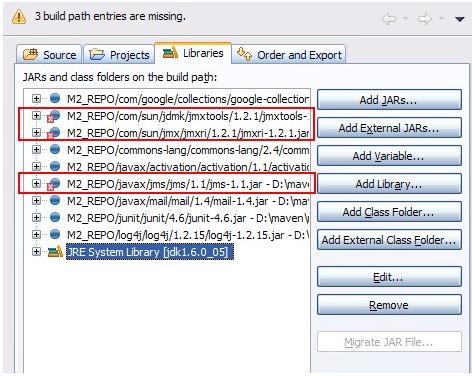
And if you’re using Eclipse, and have used the Maven Eclipse plugin command (mvn eclipse:eclipse) to generate the project settings, you’ll have the problem of Eclipse not being able to find the artifacts references on the build path, resulting in an error like so:

DIAGRAM 1:

This causes a big problem as it essentially prevents you from building your project. You could download and install these artifacts to your local repository, but since they’re not really needed, we should exclude them from the dependency list for log4j.

Excluding dependenciesThankfully, Maven make it easy to exclude dependencies from a certain project. Looking at the log4j 1.2.15 POM file (you may have to select “View Source”), we can see several dependencies that weren’t there in the previous release. These are likely to support new features, and aren’t needed for the most common uses of log4j. Here are the actual dependencies for log4j 1.2.15:

Dependencies----------------------------------------------------------
GroupId                |    ArtifactId         |    Version
----------------------------------------------------------
javax.mail              |    mail                  |    1.4
javax.jms               |    jms                  |    1.1
com.sun.jdmk        |    jmxtools          |    1.2.1
com.sun.jmx          |    jmxri                |    1.2.1
oro                        |    oro                  |    2.0.8
junit                       |    junit                 |    3.8.1
-----------------------------------------------------------
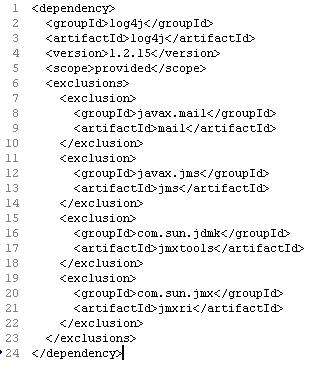
 We only need to exclude the first four, and not the last two, since they have a scope of test, and won’t be included anyways. To exclude these dependencies, add the log4j 1.2.15 dependency as show below.


This tells Maven not to add those artifacts to the classpath and so they won’t be needed to build your project anymore. Note that you have to explicitly exclude each one, there is no way to exclude all of the dependencies for a project.

If you’re using Eclipse, after running mvn eclipse:clean/mvn eclipse:eclipse, you should have the build path properly setup without any missing artifacts:

Everything should now work!
Transitive Dependencies and ExclusionsThe issue here is that the log4j 1.2.15 POM file probably should have marked these dependencies as optional, which would have had the same effect as having to exclude them on every project that referenced that version of log4j. What does an optional dependency mean? The Maven website has a pretty good explanation.

Basically, if you have a large project that requires a lot of dependencies, but the “core” features only require a subset of those dependencies, you may want to mark the others as “optional” so as not to burden any projects that reference yours. Your project will still need all of the dependencies to build, but other projects that reference yours will only need the optional dependencies if they are using the additional features. In this case, they’ll have to explicitly add those dependencies, as the transitive dependency rule won’t kick in for “optional” ones.

Also worthy to note: exclusions are done on a per-dependency basis. This means that the dependencies that we excluded from log4j are only excluded from the log4j scope. This has the effect of not globally excluding those dependencies. So, for example, if we added another dependency that did really require the javax.jms/jms artifact, it would not be prevented from being added. Furthermore, if we wanted, we could manually add a dependency to our own list for that JMS artifact, and it would show up as normal.

Friday, February 3, 2012

Java and Regular Expressions

Overview:
A regular expression defines a search pattern for strings. This pattern may match one or several times or not at all for a given string. The abbreviation for regular expression is regex.
A simple example for a regular expression is a (literal) string. For example the Hello World regex will match the "Hello World" string.
"." (dot) is another example for an regular expression. "." matches any single character; it would match for example "a" or "z" or "1".

Usage:
Regular expressions can be used to search, edit and manipulate text.
Regular expressions are supported by most programming languages, e.g. Java, Perl, Groovy, etc.
Unfortunately each language supports regular expressions slightly different.
If a regular expression is used to analyse or modify a text, this process is called "The regular expression is applied to the text".
The pattern defined by the regular expression is applied on the string from left to right. Once a source character has been used in a match, it cannot be reused. For example the regex "aba" will match "ababababa" only two times (aba_aba__).

Common Matching Symbol:

Regular Expression Description
. Matches any sign
^regex regex must match at the beginning of the line
regex$ Finds regex must match at the end of the line
[abc] Set definition, can match the letter a or b or c
[abc][vz] Set definition, can match a or b or c followed by either v or z
[^abc] When a "^" appears as the first character inside [] when it negates the pattern. This can match any character except a or b or c
[a-d1-7] Ranges, letter between a and d and figures from 1 to 7, will not match d1
X|Z Finds X or Z
XZ Finds X directly followed by Z
$ Checks if a line end follows

Meta Characters:
The following metacharacters have a pre-defined meaning and make certain common pattern easier to use, e.g. \d instead of [0..9].
Regular Expression Description
\d Any digit, short for [0-9]
\D A non-digit, short for [^0-9]
\s A whitespace character, short for [ \t\n\x0b\r\f]
\S A non-whitespace character, for short for [^\s]
\w A word character, short for [a-zA-Z_0-9]
\W A non-word character [^\w]
\S+ Several non-whitespace characters

Quantifier:
A quantifier defines how often an element can occur. The symbols ?, *, + and {} define the quantity of the regular expressions.

Regular Expression Description Examples
* Occurs zero or more times, is short for {0,} X* - Finds no or several letter X, .* - any character sequence
+ Occurs one or more times, is short for {1,} X+ - Finds one or several letter X
? Occurs no or one times, ? is short for {0,1} X? -Finds no or exactly one letter X
{X} Occurs X number of times, {} describes the order of the preceding liberal \d{3} - Three digits, .{10} - any character sequence of length 10
{X,Y} Occurs between X and Y times, \d{1,4}- \d must occur at least once and at a maximum of four
*? ? after a qualifier makes it a "reluctant quantifier", it tries to find the smallest match.  

Grouping and Back reference:
You can group parts of your regular expression. In your pattern you group elements via round brackets, e.g. "()". This allows you to assign a repetition operator the a complete group.
In addition these groups also create a backreference to the part of the regular expression. This captures the group. A backreference stores the part of the String which matched the group. This allows you to use this part in the replacement.
Via the $ you can refer to a group. $1 is the first group, $2 the second, etc.
Lets for example assume you want to replace all whitespace between a letter followed by a point or a comma. This would involve that the point or the comma is part of the pattern. Still it should be included in the result

// Removes whitespace between a word character and . or ,
String pattern = "(\\w)(\\s+)([\\.,])";
System.out.println(EXAMPLE_TEST.replaceAll(pattern, "$3"));

This example extracts the text between a title tag.
// Extract the text between the two title elements
pattern = "(?i)()(.+?)()";
String updated = EXAMPLE_TEST.replaceAll(pattern, "$2");


Blackslashes in Java
The backslash is an escape character in Java Strings. e.g. backslash has a predefined meaning in Java. You have to use "\\" to define a single backslash. If you want to define "\w" then you must be using "\\w" in your regex. If you want to use backslash you as a literal you have to type \\\\ as \ is also a escape character in regular expressions.

Using regular expression with String.matches()
Strings in Java have build in support for regular expressions. Strings have three build in methods for regular expressions, e.g. matches(), split()), replace(). .
These methods are not optimized for performance. We will later use classes which are optimized for performance.

Method Description
s.matches("regex") Evaluates if "regex" matches s. Returns only true if the WHOLE string can be matched
s.split("regex") Creates array with substrings of s divided at occurance of "regex". "regex" is not included in the result.
s.replace("regex"), "replacement" Replaces "regex" with "replacement

Create for the following example the Java project com.dixit.regex.test.
package com.dixit.regex.test;

public class RegexTestStrings {
    public static final String EXAMPLE_TEST = "This is my small example "
            + "string which I'm going to " + "use for pattern matching.";

    public static void main(String[] args) {
        System.out.println(EXAMPLE_TEST.matches("\\w.*"));
        String[] splitString = (EXAMPLE_TEST.split("\\s+"));
        System.out.println(splitString.length);// Should be 14
        for (String string : splitString) {
            System.out.println(string);
        }
        // Replace all whitespace with tabs
        System.out.println(EXAMPLE_TEST.replaceAll("\\s+", "\t"));
    }
}


Examples:
The following class gives several examples for the usage of regular expressions with strings. See the comment for the purpose.
If you want to test these examples, create for the Java project com.dixit.regex.string.

package com.dixit.regex.string;

public class StringMatcher {
    // Returns true if the string matches exactly "true"
    public boolean isTrue(String s){
        return s.matches("true");
    }
    // Returns true if the string matches exactly "true" or "True"
    public boolean isTrueVersion2(String s){
        return s.matches("[tT]rue");
    }
   
    // Returns true if the string matches exactly "true" or "True"
    // or "yes" or "Yes"
    public boolean isTrueOrYes(String s){
        return s.matches("[tT]rue|[yY]es");
    }
   
    // Returns true if the string contains exactly "true"
    public boolean containsTrue(String s){
        return s.matches(".*true.*");
    }
   

    // Returns true if the string contains of three letters
    public boolean isThreeLetters(String s){
        return s.matches("[a-zA-Z]{3}");
        // Simpler from for
//        return s.matches("[a-Z][a-Z][a-Z]");
    }
   
    // Returns true if the string does not have a number at the beginning
    public boolean isNoNumberAtBeginning(String s){
        return s.matches("^[^\\d].*");
    }
    // Returns true if the string contains a arbitrary number of characters except b
    public boolean isIntersection(String s){
        return s.matches("([\\w&&[^b]])*");
    }
    // Returns true if the string contains a number less then 300
    public boolean isLessThenThreeHundret(String s){
        return s.matches("[^0-9]*[12]?[0-9]{1,2}[^0-9]*");
    }
   
}


And a small JUnit Test to validates the examples.
------------------------------------------------------------------------------------------------------------------------------------------------------package com.dixit.regex.string;

import org.junit.Before;
import org.junit.Test;

import static org.junit.Assert.assertFalse;
import static org.junit.Assert.assertTrue;

public class StringMatcherTest {
    private StringMatcher m;

    @Before
    public void setup(){
        m = new StringMatcher();
    }

    @Test
    public void testIsTrue() {
        assertTrue(m.isTrue("true"));
        assertFalse(m.isTrue("true2"));
        assertFalse(m.isTrue("True"));
    }

    @Test
    public void testIsTrueVersion2() {
        assertTrue(m.isTrueVersion2("true"));
        assertFalse(m.isTrueVersion2("true2"));
        assertTrue(m.isTrueVersion2("True"));;
    }

    @Test
    public void testIsTrueOrYes() {
        assertTrue(m.isTrueOrYes("true"));
        assertTrue(m.isTrueOrYes("yes"));
        assertTrue(m.isTrueOrYes("Yes"));
        assertFalse(m.isTrueOrYes("no"));
    }

    @Test
    public void testContainsTrue() {
        assertTrue(m.containsTrue("thetruewithin"));
    }

    @Test
    public void testIsThreeLetters() {
        assertTrue(m.isThreeLetters("abc"));
        assertFalse(m.isThreeLetters("abcd"));
    }
   
    @Test
    public void testisNoNumberAtBeginning() {
        assertTrue(m.isNoNumberAtBeginning("abc"));
        assertFalse(m.isNoNumberAtBeginning("1abcd"));
        assertTrue(m.isNoNumberAtBeginning("a1bcd"));
        assertTrue(m.isNoNumberAtBeginning("asdfdsf"));
    }
   
    @Test
    public void testisIntersection() {
        assertTrue(m.isIntersection("1"));
        assertFalse(m.isIntersection("abcksdfkdskfsdfdsf"));
        assertTrue(m.isIntersection("skdskfjsmcnxmvjwque484242"));
    }
   

    @Test
    public void testLessThenThreeHundret() {
        assertTrue(m.isLessThenThreeHundret("288"));
        assertFalse(m.isLessThenThreeHundret("3288"));
        assertFalse(m.isLessThenThreeHundret("328 8"));
        assertTrue(m.isLessThenThreeHundret("1"));
        assertTrue(m.isLessThenThreeHundret("99"));
        assertFalse(m.isLessThenThreeHundret("300"));
    }
}


Pattern and Matcher
For advanced regular expressions the java.util.regex.Pattern and java.util.regex.Matcher classes are used.
You first create a Pattern object which defines the regular expression. This Pattern object allows you to create a Matcher object for a given string. This Matcher object then allows you to do regex operations on a String.
           
package com.dixit.regex.test;

import java.util.regex.Matcher;
import java.util.regex.Pattern;

public class RegexTestPatternMatcher {
    public static final String EXAMPLE_TEST = "This is my small example string which I'm going to use for pattern matching.";

    public static void main(String[] args) {
        Pattern pattern = Pattern.compile("\\w+");
        // In case you would like to ignore case sensitivity you could use this
        // statement
        // Pattern pattern = Pattern.compile("\\s+", Pattern.CASE_INSENSITIVE);
        Matcher matcher = pattern.matcher(EXAMPLE_TEST);
        // Check all occurance
        while (matcher.find()) {
            System.out.print("Start index: " + matcher.start());
            System.out.print(" End index: " + matcher.end() + " ");
            System.out.println(matcher.group());
        }
        // Now create a new pattern and matcher to replace whitespace with tabs
        Pattern replace = Pattern.compile("\\s+");
        Matcher matcher2 = replace.matcher(EXAMPLE_TEST);
        System.out.println(matcher2.replaceAll("\t"));
    }
}


Java Regrex Examples:
The following lists typical examples for the usage of regular expressions. I hope you find similarities to your examples.

OR
Task: Write a regular expression which matches a text line if this text line contains either the word "Joe" or the word "Jim" or both.
Create a project com.dixit.regex.eitheror and the following class.
-------------------------------------------------------------------------------------------------------------------------------------
package com.dixit.regex.eitheror;

import org.junit.Test;

import static org.junit.Assert.assertFalse;
import static org.junit.Assert.assertTrue;

public class EitherOrCheck {
    @Test
    public void testSimpleTrue() {
        String s = "humbapumpa jim";
        assertTrue(s.matches(".*(jim|joe).*"));
        s = "humbapumpa jom";
        assertFalse(s.matches(".*(jim|joe).*"));
        s = "humbaPumpa joe";
        assertTrue(s.matches(".*(jim|joe).*"));
        s = "humbapumpa joe jim";
        assertTrue(s.matches(".*(jim|joe).*"));
    }
}
-------------------------------------------------------------------------------------------
---------------------------------

Phone number
Task: Write a regular expression which matches any phone number.
A phone number in this example consists either out of 7 numbers in a row or out of 3 number a (white)space or a dash and then 4 numbers.

-----------------------------------------------------------------------------------------------------------------------------------------               
package com.dixit.regex.phonenumber;

import org.junit.Test;
import static org.junit.Assert.assertFalse;
import static org.junit.Assert.assertTrue;


public class CheckPhone {
   
    @Test
    public void testSimpleTrue() {
        String pattern = "\\d\\d\\d([,\\s])?\\d\\d\\d\\d";
        String s= "1233323322";
        assertFalse(s.matches(pattern));
        s = "1233323";
        assertTrue(s.matches(pattern));
        s = "123 3323";
        assertTrue(s.matches(pattern));
    }
}
-----------------------------------------------------------------------------------------------------------------------------------------
           

Check for a certain number range
The following example will check if a text contains a number with 3 digits.
Create the Java project "com.dixit.regex.numbermatch" and the following class.
-----------------------------------------------------------------------------------------------------------------------------------------
package de.vogella.regex.numbermatch;
import java.util.regex.Matcher;
import java.util.regex.Pattern;

import org.junit.Test;

import static org.junit.Assert.assertFalse;
import static org.junit.Assert.assertTrue;

public class CheckNumber {
    @Test
    public void testSimpleTrue() {
        String s= "1233";
        assertTrue(test(s));
        s= "0";
        assertFalse(test(s));
        s = "29 Kasdkf 2300 Kdsdf";
        assertTrue(test(s));
        s = "99900234";
        assertTrue(test(s));
    }
    public static boolean test (String s){
        Pattern pattern = Pattern.compile("\\d{3}");
        Matcher matcher = pattern.matcher(s);
        if (matcher.find()){
            return true;
        }
        return false;
    }

}
-----------------------------------------------------------------------------------------------------------------------------------------

Building a link checker
The following example allows you to extract all valid links from a webpage. It does not consider links with start with "javascript:" or "mailto:".
Create the Java project com.dixit.regex.weblinks and the following class:
-----------------------------------------------------------------------------------------------------------------------------------------
package com.dixit.regex.weblinks;

import java.io.BufferedReader;
import java.io.IOException;
import java.io.InputStreamReader;
import java.net.MalformedURLException;
import java.net.URL;
import java.util.ArrayList;
import java.util.List;
import java.util.regex.Matcher;
import java.util.regex.Pattern;

public class LinkGetter {
    private Pattern htmltag;
    private Pattern link;
    private final String root;

    public LinkGetter(String root) {
        this.root = root;
        htmltag = Pattern.compile("]*href=\"[^>]*>(.*?)");
        link = Pattern.compile("href=\"[^>]*\">");
    }

    public List getLinks(String url) {
        List links = new ArrayList();
        try {
            BufferedReader bufferedReader = new BufferedReader(
                    new InputStreamReader(new URL(url).openStream()));
            String s;
            StringBuilder builder = new StringBuilder();
            while ((s = bufferedReader.readLine()) != null) {
                builder.append(s);
            }

            Matcher tagmatch = htmltag.matcher(builder.toString());
            while (tagmatch.find()) {
                Matcher matcher = link.matcher(tagmatch.group());
                matcher.find();
                String link = matcher.group().replaceFirst("href=\"", "")
                        .replaceFirst("\">", "");
                if (valid(link)) {
                    links.add(makeAbsolute(url, link));
                }
            }
        } catch (MalformedURLException e) {
            e.printStackTrace();
        } catch (IOException e) {
            e.printStackTrace();
        }
        return links;
    }

    private boolean valid(String s) {
        if (s.matches("javascript:.*|mailto:.*")) {
            return false;
        }
        return true;
    }

    private String makeAbsolute(String url, String link) {
        if (link.matches("http://.*")) {
            return link;
        }
        if (link.matches("/.*") && url.matches(".*$[^/]")) {
            return url + "/" + link;
        }
        if (link.matches("[^/].*") && url.matches(".*[^/]")) {
            return url + "/" + link;
        }
        if (link.matches("/.*") && url.matches(".*[/]")) {
            return url + link;
        }
        if (link.matches("/.*") && url.matches(".*[^/]")) {
            return url + link;
        }
        throw new RuntimeException("Cannot make the link absolute. Url: " + url
                + " Link " + link);
    }
}
-----------------------------------------------------------------------------------------------------------------------------------------

Monday, January 30, 2012

Apache: No space left on device: Couldn't create accept lock

This error completely stumped me a couple of weeks ago. Apparently someone was adjusting the Apache configuration, then they checked their syntax and attempted to restart Apache. It went down without a problem, but it refused to start properly, and didn't bind to any ports.

Within the Apache error logs, this message appeared over and over:
[emerg] (28)No space left on device: Couldn't create accept lock

Apache is basically saying "I want to start, but I need to write some things down before I can start, and I have nowhere to write them!" If this happens to you, check these items in order:

1. Check your disk space
This comes first because it's the easiest to check, and sometimes the quickest to fix. If you're out of disk space, then you need to fix that problem.


2. Review filesystem quotasIf your filesystem uses quotas, you might be reaching a quota limit rather than a disk space limit. Use repquota / to review your quotas on the root partition. If you're at the limit, raise your quota or clear up some disk space. Apache logs are usually the culprit in these situations.

3. Clear out your active semaphoresSemaphores? What the heck is a semaphore? Well, it's actually an apparatus for conveying information by means of visual signals. But, when it comes to programming, semaphores are used for communicating between the active processes of a certain application. In the case of Apache, they're used to communicate between the parent and child processes. If Apache can't write these things down, then it can't communicate properly with all of the processes it starts.

I'd assume if you're reading this article, Apache has stopped running. Run this command as root:
# ipcs -s
----------------------------- 
# ipcs
# ipcrm -s sem_id

# ipcrm -m mem_id
-----------------------------
If you see a list of semaphores, Apache has not cleaned up after itself, and some semaphores are stuck. Clear them out with this command:
# for i in `ipcs -s | awk '/httpd/ {print $2}'`; do (ipcrm -s $i); done

Now, in almost all cases, Apache should start properly. If it doesn't, you may just be completely out of available semaphores. You may want to increase your available semaphores, and you'll need to tickle your kernel to do so. Add this to /etc/sysctl.conf:
kernel.msgmni = 1024
kernel.sem = 250 256000 32 1024

And then run sysctl -p to pick up the new changes.

Sunday, January 29, 2012

What is 'No SQL' ?

NoSQL is a term used to refer to a class of database systems that differ from the traditional relational database management systems (RDBMS) in many ways. RDBMSs are accessed using SQL. Hence the term NoSQL implies not accessed by SQL. More specifically not RDBMS or more accurately not relational.

Some key characteristics of NqSQL databases are : 
  • They are distributed, can scale horizontally and can handle data volumes of the order of several terrabytes or petabytes, with low latency.
  • They have less rigid schemas than a traditional RDBMS.
  • They have weaker transactional guarantees.
  • As suggested by the name, these databases do not support SQL.
  • Many NoSQL databases model data as row with column families, key value pairs or documents
 To understand what non relational means, it might be useful to recap what relational means.

Theoretically, relational databases comply with Codds 12 rules of relational model. More simply, in RDBMS, a table is relation and database has a set of such relations. A table has rows and columns. Each table has contraints and the database enforces the constraints to ensure the integrity of data.Each row in a table is identified by a primary key and tables are related using foreign keys. You eliminate duplicate data during the process of normalization, by moving columns into separate tables but keeping the relation using foreign keys. To get data out of multiple tables requires joining the tables using the foreign keys. This relational model has been useful in modeling most real world problems and is in widespread use for the last 20 years.

In addition, RDBMS vendors have gone to great lengths to ensure that RDBMSs do a great job in maintaining ACID (actomic, consistent, integrity, durable) transactional properties for the data stored. Recovery is supported from unexpected failures. This has lead to relational databases becoming the de facto standard for storing enterprise data.

If RDBMSs are so good, Why does any one need NoSQL databases ?Even the largest enterprises have users only in the order of 1000s and data requirements in the order of few terra bytes. But when your application is on the internet, where you are dealing with millions of users and data in the order of petabytes, things start to slow down with a RDBMS. The basic operations with any database are read and write. Reads can be scaled by replicating data to multiple machines and load balancing read requests. However this does not work for writes because data consistency needs to be maintained. Writes can be scaled only by partitioning the data. But this affects read as distributed joins can be slow and hard to implement. Additionally, to maintain ACID properties, databases need to lock data at the cost of performance.

The Googles, facebooks , Twitters have found that relaxing the constraints of RDBMSs and distributing data gives them better performance for usecases that involve
  • Large datasets of the order of petabytes. Typically this needs to stored using multiple machines.
  • The application does a lot of writes.
  • Reads require low latency.
  • Data is semi structured.
  • You need to be able to scale without hitting a bottleneck.
  • Application knows what it is looking for. Adhoc queries are not required.
What are the NoSQL solutions out there ?
There are a few different types.
1. Key Value Stores
They allow clients to read and write values using a key. Amazon's Dynamo is an example of a key value store.
get(key) returns an object or list of objects
put(key,object) store the object as a blob


Dynamo use hashing to partition data across hosts that store the data. To ensure high availability, each write is replicated across several hosts. Hosts are equal and there is no master. The advantage of Dynamo is that the key value model is simple and it is highly available for writes.

2. Document stores
The key value pairs that make up the data are encapsulated as a document. Apache CouchDB is an example of a document store. In CouchDB , documents have fields. Each field has a key and value. A document could be
--------------------------------------------------------
1    "firstname " : " John ",
2    "lastname " : "Doe" ,
3    "street " : "1 main st",
4    "city " : "New york"
----------------------------------------------------------
In CouchDB, distribution and replication is peer to peer. Client interface is RESTful HTTP, that integrated well with existing HTTP loadbalancing solutions.

3. Column based storesRead and write is done using columns rather than rows. The best known examples are Google's BigTable and the likes of HBase and Cassandra that were inspired by BigTable. The BigTable paper says that BigTable is a sparse, distributed, persistent, multidimensional sorted Map. While that sentence seems complicated, reading each word individually gives clarity.
  • sparse - some cells can be empty
  • distributed - data is partitioned across many hosts
  • persistent - stored to disk
  • multidimensional - more than 1 dimension
  • Map - key and value
  • sorted - maps are generally not sorted but this one is
This sample might help you visualize a BigTable map
-----------------------------------------------------------------------------------------------------
    {
    row1:{
        user:{
              name: john
              id : 123
        },
        post: {
              title:This is a post  
              text : xyxyxyxx
        }
    }
    row2:{
        user:{
              name: joe
              id : 124
        },
        post: {
              title:This is a post  
              text : xyxyxyxx
        }
    }
    row3:{
        user:{
              name: jill
              id : 125
        },
        post: {
              title:This is a post  
              text : xyxyxyxx
        }
    }
    }
-----------------------------------------------------------------------------------------------
The outermost keys row1,row2, row3 are analogues to rows. user and post are what are called column families. The column family user has columns name and id. post has columns title and text.

Columnfamily:column is how you refer to a column. For eg user:id or post:text. In Hbase, when you create the table, the column families need to be specified. But columns can be added on the fly. HBase provides high availability and scalability using a master slave architecture.

Do I needs a NoSQL store ?
You do not need a NoSQL store if:

  1. All your data fits into 1 machine and does not need to be partitioned.
  2. You are doing OLTP which required the ACID transaction properties and data consistency that RDBMSs are good at.
  3. You need ad hoc querying using a language like SQL.
  4. You have complicated relationships between the entities in your applications.
  5. Decoupling data from application is important to you.
You might want to start considering NoSQL stores if:

  1. Your data has grown so large that it can no longer be handled without partitioning.
  2. Your RDBMS can no longer handle the load.
  3. You need very high write performance and low latency reads.
  4. Your data is not very structured.
  5. You can have no single point of failure.
  6. You can tolerate some data inconsistency.
Bottomline is that NoSql stores are a new and complex technology. There are many choices and no standards. There are specific use cases for which NoSql is a good fit. But RDBMS does just fine for most vanilla use cases.

Saturday, January 28, 2012

Installing Dansguardian on LinuxMCE

DansGuardian is an award winning Open Source web content filter which currently runs on Linux, FreeBSD, OpenBSD, NetBSD, Mac OS X, HP-UX, and Solaris. It filters the actual content of pages based on many methods including phrase matching, PICS filtering and URL filtering. It does not purely filter based on a banned list of sites like lesser totally commercial filters.

DansGuardian is designed to be completely flexible and allows you to tailor the filtering to your exact needs. It can be as draconian or as unobstructive as you want. The default settings are geared towards what a primary school might want but DansGuardian puts you in control of what you want to block.

DansGuardian is a true web content filter. We will see how to configure DansGuardian on Ubuntu Linux along with LinuxMCE.

Installing packages
tinyproxy
    apt-get install tinyproxy
   
shorewall
   apt-get install shorewall

dansguardian
   apt-get install dansguardian

dhcp
   apt-get install dhcp3-server

dns server
   apt-get install dnsmasq

Dansguardian Web Log Viewer
   apt-get install dglog


Installing webmin and dansguardian webmin module
First you need to install the additional packages:
   sudo aptitude install perl libnet-ssleay-perl openssl libauthen-pam-perl libpam-runtime libio-pty-perl libmd5-perl

Download and install webmin package:
   wget http://prdownloads.sourceforge.net/webadmin/webmin_1.480_all.deb   
   sudo dpkg -i webmin_1.480_all.deb


Configure PackagesTinyproxy
   vi /etc/tinyproxy/tinyproxy.conf 
Make the following changes
    1. User root
    2. Group root
    3. Allow 192.168.80.0/25

Dansguardian
  vi  /etc/dansguardian/dansguardian.conf
Make the following changes:
    1. Delete UNCONFIGURED line
    2. filterport = 8081
    3. proxyip = 192.168.80.1
    4. proxyport = 8888
    5. usernameidmethodproxyauth = off

Shorewall:

Make the following changes:
copy configuration files (take backup of existing files):
  cp /usr/share/doc/shorewall-common/default-config/* /etc/shorewall/

set "shorewall" auto start at boot time:
  vi /etc/default/shorewall
    startup = 1

"zones" tells the firewall to zone each name for the rest configuration file e.g. loc, net:
  vi /etc/shorewall/zones
    1. #ZONES TYPE OPTION IN OUT
    2. #OPTIONS OPTIONS
    3. fw firewall
    4. net ipv4
    5. loc ipv4
    6. #Last Line - ADD ENTRIES ABOVE THIS ONE - DO NOT REMOVE

"interfaces" tells the firewall which is internal and external interfaces:
  vi /etc/shorewall/interfaces
    1. #ZONE INTERFACE BROADCAST OPTIONS
    2. #Note assuming "eth1"- is internal ip & "eth0"- is external ip
    3. net eth0 detect dhcp,tcpflags
    4. loc eth1 detect dhcp
    5. #LAST LINE --ADD YOUR ENTRIES ABOVE THIS ONE - DO NOT REMOVE

"masq" tells the firewall that internal network(eth1)is connected through external network(eth0):
  vi /etc/shorewall/masq
    1. #INTERFACE SUBNET ADDRESS PROTO PORT(S) IPSEC
    2. eth0 eth1
    3. #LAST LINE --ADD YOUR ENTRIES ABOVE THIS ONE - DO NOT REMOVE

"policy" tells the firewall that how should handle the requests:
  vi /etc/shorewall/policy
    1. loc all ACCEPT
    2. net all DROP
    3. fw all ACCEPT
    4. all all REJECT

"shorewall.conf" we will configure ip_forwarding:
  vi /etc/shorewall/shorewall.conf
    1. IP_FORWARDING=On

"rules" allows to set firewall rules:
  vi /etc/shorewall/rules    1. SECTION NEW
    2. ACCEPT net fw tcp 80
    3. REDIRECT loc 8081 tcp www
    4. ACCEPT loc fw tcp 22
    5. ACCEPT net fw icmp
    6. ACCEPT loc loc icmp
    7. #LAST LINE --ADD YOUR ENTRIES ABOVE THIS ONE - DO NOT REMOVE

# check shorewall working or not properly:
  shorewall check

Restart Applications
   /etc/init.d/dnsmasq restart
   /etc/init.d/tinyproxy restart
   /etc/init.d/shorewall restart
   /etc/init.d/dansguardian restart

 Troubleshooting:
   1.  Still not working restart the system once
   2.  Check all service started are not "ps -ef | grep " service - apache2, dnsmasq, tinyproxy, shorewall, dansguardian, and dhcpd.  If any of the service is not starting, start the service sh /etc/init.d. start.  Check especially dnsmasq and shorewall services.


DHCP Server:
Note: you need not to make any changes if you are working on single system or dhcp is already running on your local network interface(any changes dhcpd.conf or interfaces respective files)
 vi /etc/default/dhcp3-server
    1. INTERFACE="eth1"

 vi /etc/dhcp3/dhcpd.conf
    1. #change the subnet, netmask, range, dns, router as per your settings
    2. default-leasetime=86400
    3. max-leasetime=60480
    4. subnet 192.168.0.0 netmask 255.255.255.0{
    5. range 192.168.0.2 192.168.1.99;
    6. option domain-name-server 192.168.80.1;
    7. option routers 192.168.80.2;
    8. }

set static ip address:
 vi /etc/network/interfaces
    1. auto lo
    2. iface lo inet loopback
    3. auto eth0
    4. iface eth0 inet dhcp
    5. auto eth1
    6. iface eth1 inet static
    7. address 192.168.80.1
    8. netmask 255.255.255.0

 #restart dhcp
    /etc/init.d/dhcpd restart

Adding BlackList
A BlackList is a precompiled list of sites that are deemed potentially worrisome.
    cd /etc/dansguardian   
    wget http://urlblacklist.com/downloads/OriginalUpdateBL
    vi OriginalUpdateBL

    1. modify line 68 by switching the listed URL with the following:
    2. http://urlblacklist.com/cgi-bin/commercialdownload.pl?type=download&file=bigblacklist

   chmod 777 /etc/dansguardian/OriginalUpdateBL
   /etc/dansguardian/OriginalUpdateBL

when script is finished if you see any errors.
   /etc/init.d/dansguardian restart

if the above script is not creating blacklists directory and creating blacklists file then follow the following:
   cd /etc/dansguardian 
   wget http://urlblacklist.com/cgi-bin/commercialdownload.pl?type=download&file=bigblacklist
   tar -xvf bigblacklist.tar.gz
   chown -R root:root blacklists
   chmod -R 755 blacklists


Webmin and Dansguardian webmin configuration
Login into Webmin(open your web browser and enter the following):
 https://192.168.80.1:10000/
Install and configure the Dansguardian Webmin module:
   1.Open browser & login as madmin(sudo user) https://192.168.80.1:10000
   2.Go to Webmin > Webmin Configuration > Webmin Modules
   Select "From ftp or http URL" and paste the link below into the dialog box and click Install Module.
  (http://downloads.sourceforge.net/project/dgwebminmodule/dgwebmin-devel/0.7.0beta1b/dgwebmin-0.7.0beta1b.wbm?use_mirror=voxel)
  
   Observe: The following modules have been successfully installed and added to your access control list :
   DansGuardian Web Content Filter in /usr/share/webmin/dansguardian (4612 kB) under category Servers

Trouble shooting:
The first time you try to run the dg module, you'll get errors such as:
   Warning - DansGuardian binary file not found, maybe you need to update your module config (especially the directory paths).  (Expected location: /sbin/dansguardian)

Solution:The problem is that the we are using different directory locations for many of the files. So, look at the Configurable options for DansGuardian Web Content Filter (in the upper left corner of the dg page) - and nearly every path needs to be changed.

For instance, our binary is in /usr/sbin/dansguardian instead of /sbin/dansguardian, so change that.
Confirm the locations for the rest of the files by running

find / -name dansguardian
results may show:
   /usr/share/webmin/dansguardian
   /usr/share/lintian/overrides/dansguardian
   /usr/share/doc/dansguardian
   /usr/share/dansguardian
   /usr/sbin/dansguardian
   /var/log/dansguardian
   /etc/webmin/dansguardian
   /etc/init.d/dansguardian
   /etc/logrotate.d/dansguardian
   /etc/dansguardian


When you've finished replacing all of the locations, hit save on the config page and then "stop & restart DG" on the top right of the main DG page.

Then it should work! If not, check your syslog for errors. You should be able to check the status of DG, review logs with a good viewer, and view and edit many of the detailed configurations.